
WooCommerce Order Management, Invoices & Sell Returns
Website orders and POS sales in one list — with invoices, packing slips, payments, profit, returns and notifications.
Demo login: admin / admin · Support · Free vs Pro · Free version
What Sales & Orders does
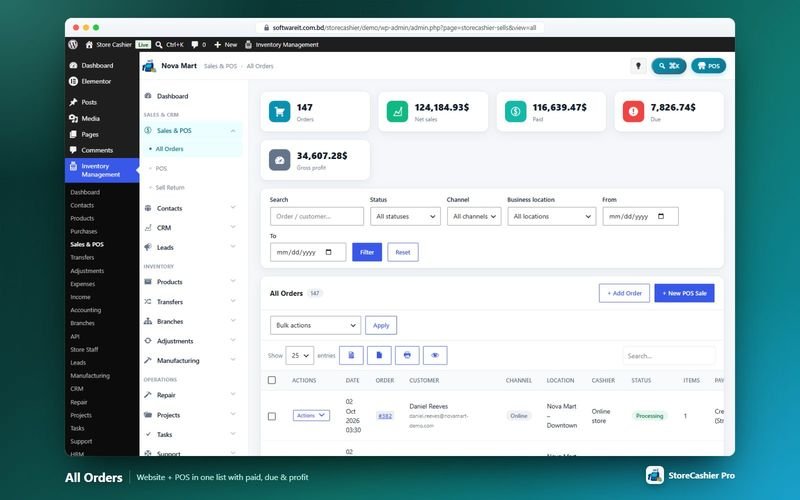
StoreCashier never keeps a second order database. WooCommerce orders are the source of truth, and StoreCashier mirrors them into its sales ledger for payments, profit and reports. All Orders shows checkout and POS orders together, with channel, status and date filters, invoices and receipts, packing slips, bulk status changes, bulk invoice printing and CSV export.
Stock is deducted automatically when an order reaches the statuses you choose, and cancelled orders give the stock back. StoreCashier Pro adds an in-plugin order editor, sell returns (credit notes) with restocking, automatic mirroring of WooCommerce refunds and order notifications by e-mail, SMS and WhatsApp with an optional PDF invoice.
Availability: Available in the free plugin and in StoreCashier Pro — items marked Pro need StoreCashier Pro.
Sales & Orders features
Free = included in the free StoreCashier plugin on WordPress.org (and in Pro). Pro = StoreCashier Pro only.
All orders in one place
- Website and POS orders in one list FreeWooCommerce checkout and POS orders with channel (Online / POS), status and date filters.
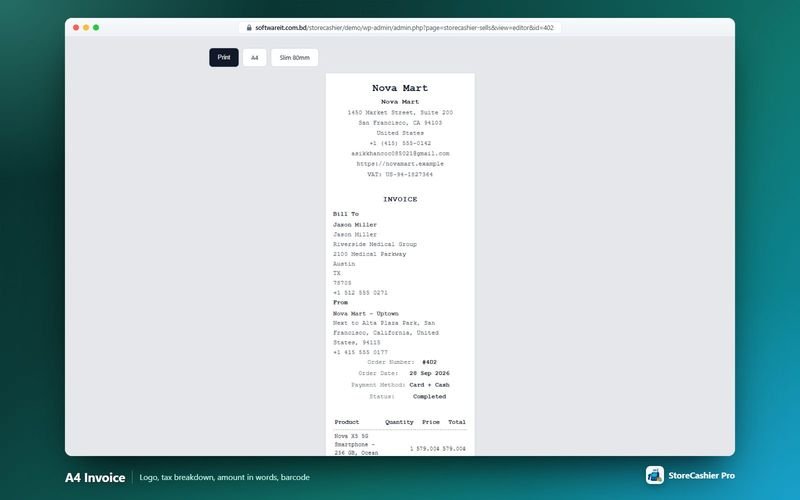
- Invoices and receipts FreeYour logo, business details, header and footer text and an invoice number scheme, in a standard A4 or slim 80 mm layout.
- Packing slips, bulk actions and CSV export FreeBulk status changes, bulk invoice / packing slip printing (one order per page) and CSV export.
- StoreCashier panel on the WooCommerce order screen FreeBusiness location, stock deduction, payments and IMEI / serial assignment right on the native order screen.
- Automatic stock deduction FreeChoose the order statuses that deduct stock (for example Processing and Completed). Items are deducted once; cancelled orders return the stock.
- Payments, dues and profit FreeRecord payments against orders; paid and due amounts are calculated from the StoreCashier payment ledger, and the cost price at the time of sale keeps profit reports correct.
- Bulk change business location ProMove orders to another location (or “Not selected”); deducted stock is re-booked at the new location.
Order editor
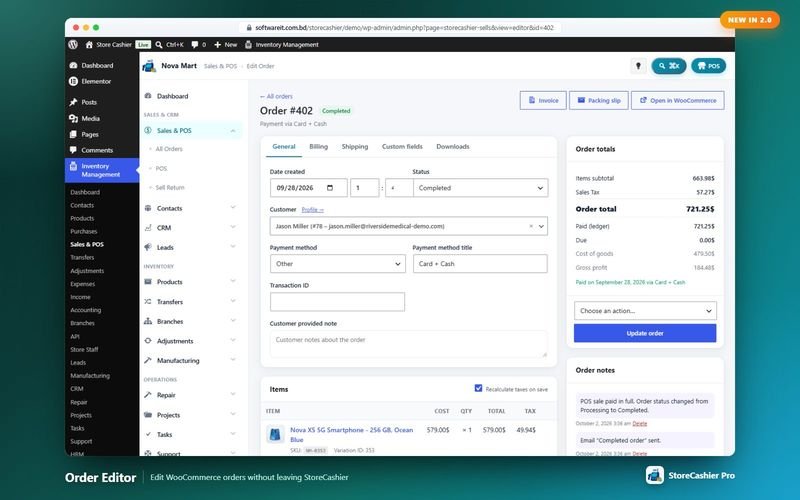
- Create and edit WooCommerce orders in-plugin ProGeneral, billing, shipping, custom fields and downloads tabs, using the WooCommerce data API so it works with HPOS and legacy storage and fires the normal WooCommerce e-mails and hooks.
- Items, fees, shipping and coupons ProAdd products by name, SKU or barcode, add fees (fixed or %, negative for a discount), shipping lines and coupons, then recalculate.
- Refunds ProRefund with optional restocking via the gateway (when supported) or manually; each refund is listed and can be deleted.
- Order totals with profit ProSidebar totals include refunded amount, net payment, paid, due, cost of goods and gross profit.
Returns and notifications
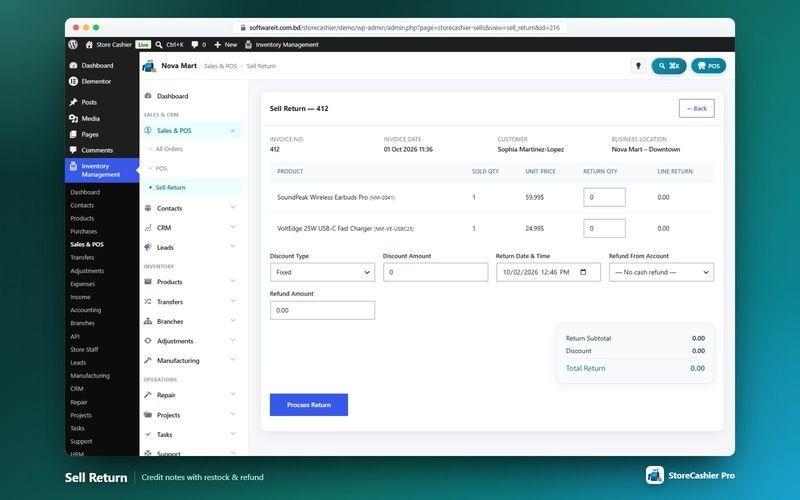
- Sell returns (credit notes) ProReturn items from any sale with the correct stock, ledger and customer-due effects; quantities are restocked at the sale's location.
- WooCommerce refunds mirrored ProRefunds made in WooCommerce are mirrored as StoreCashier sell returns automatically.
- E-mail, SMS and WhatsApp notifications ProNotify customers about new orders (website and POS) and status changes by e-mail (WordPress mail or SMTP), SMS (Twilio, Vonage, Plivo, MessageBird, Infobip or a custom HTTP provider) and WhatsApp (Meta WhatsApp Cloud API or a custom API).
- PDF invoice attachment ProAttach the sale invoice as a PDF generated locally by the built-in PDF writer.
Safe on existing stores
- Sales history import without stock moves FreeOrders placed before installation are imported into the reports with the business location “Not selected”, so they never reduce stock twice.
Get StoreCashier Pro for $59 $99Unlock every Sales & Orders feature plus all other Pro modules.
How Sales & Orders works
The typical workflow, step by step.
- Orders arriveOnline checkout orders and POS sales appear in All Orders, each with its channel and location.
- Stock is deducted onceWhen an order reaches a deducting status, its items leave the ledger; cancellation gives them back.
- Print and collectPrint invoices or packing slips (one or in bulk) and record payments against the order.
- Edit or returnEdit the order in-plugin, refund it or create a sell return with restocking (Pro).
- Notify the customerSend e-mail, SMS or WhatsApp messages with an optional PDF invoice (Pro).
Sales & Orders screenshots
Real screens from the StoreCashier Pro demo store. Click to enlarge.
Get StoreCashier Pro for $59 $99See it yourself in the live demo (admin / admin), then buy once.
Sales & Orders FAQ
Answers based on the StoreCashier documentation.
How is stock deducted for online orders?
You choose the WooCommerce order statuses that deduct stock from the ledger. When an order reaches one of them, its items are deducted once; cancelled orders give the stock back. POS sales always deduct stock when the sale is saved.
Can I customise invoices and receipts?
Yes. Add your logo and business details, header and footer text, choose the standard A4 or slim 80 mm layout and set the invoice number scheme.
Is the order editor compatible with HPOS?
Yes. The StoreCashier Pro order editor uses the WooCommerce data API throughout, so it works with High-Performance Order Storage and legacy storage and fires the normal WooCommerce e-mails and hooks.
What is the difference between a sell return and a WooCommerce refund?
A sell return (credit note) restocks items and adjusts the customer due but does not refund money through the payment gateway. Refunds made in WooCommerce are mirrored back as sell returns automatically.
Does StoreCashier Pro send SMS or WhatsApp notifications?
Yes. StoreCashier Pro can notify customers about new orders and status changes by e-mail, SMS and WhatsApp, optionally with a PDF invoice. It contacts a messaging provider only after an administrator enables and configures one.
More answers in the full FAQ and the documentation.
Get StoreCashier Pro for $59 $99All 20 optional modules plus the advanced POS, multi-location stock and 60 reports.
Related modules
Everything in StoreCashier shares one database, so these modules work together out of the box.
POS Register Free + Pro
A full-screen, touch-friendly and keyboard-first register for any desktop, laptop or tablet browser. Every sale is a real WooCommerce order.
Explore POS Register →Contacts Free + Pro
Everyone you sell to and buy from — with balances, statements and two-way sync with WooCommerce customers and WordPress users.
Explore Contacts →Accounting Free + Pro
Money follows every transaction: sales, purchases, expenses, payroll and refunds post to the right payment account automatically.
Explore Accounting →Reports Free + Pro
A dashboard that respects permissions, 60 built-in reports in StoreCashier Pro and a Report Builder that pins your own charts to the dashboard.
Explore Reports →Inventory Free + Pro
Know your stock down to the product, variation, location and lot — with every movement recorded in an append-only ledger and synced to WooCommerce.
Explore Inventory →
Get StoreCashier Pro for $59
Sales & Orders is included in StoreCashier Pro together with every other module — one plugin, one-time payment.
Start free, upgrade anytime. 7 of the Sales & Orders features on this page are already in the free StoreCashier plugin on WordPress.org. Install it at no cost, then upgrade to Pro — your data is kept.
Download StoreCashier FreeDemo login: admin / admin · Support · Free version on WordPress.org · Pricing details