
WooCommerce Bookings & Appointments Plugin
Bookable WooCommerce products by minutes, hours, days or nights — with resources, persons, deposits, a calendar and customer self-service.
Demo login: admin / admin · Support · Free vs Pro · Free version
What Bookings does
StoreCashier Pro adds a Bookable product type to WooCommerce for appointments, rentals, classes and hotel-style stays. Each bookable product has fixed or customer-defined blocks, capacity, buffers, advance-booking limits, optional admin confirmation, a cancellation window and deposits, plus prioritised availability rules, dynamic cost rules, persons and person types and resources such as rooms, staff or equipment.
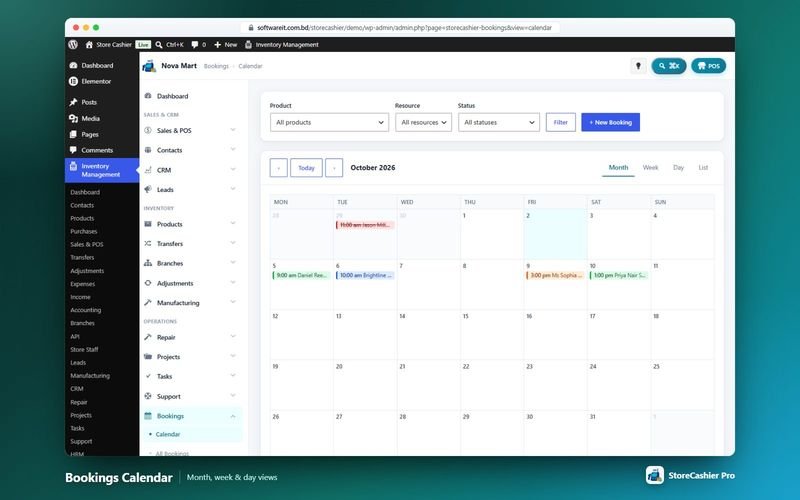
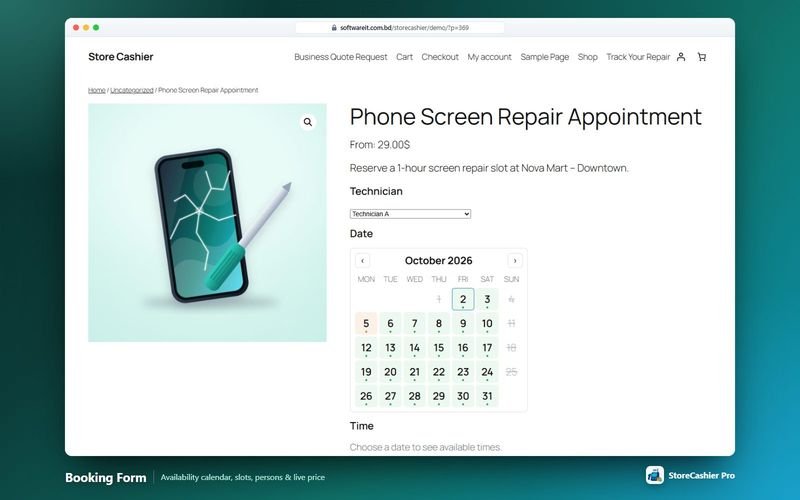
On the website the booking form replaces Add to cart and shows a calendar of available, partially booked and unavailable days with time slots and a live quote. Staff manage everything in a month / week / day calendar, and customers see, pay, cancel and add bookings to their calendar from WooCommerce My Account.
Availability: This module is part of StoreCashier Pro. In the free plugin it is visible as a read-only preview marked PRO.
Bookings features
Bookable products
- Durations ProFixed or customer-defined blocks of minutes, hours, days or nights (hotel-style check-in / check-out), with min / max duration and first slot start.
- Capacity and limits ProMax bookings per block, minimum and maximum advance booking, buffer periods before and after, and admin confirmation.
- Availability rules ProAvailable or unavailable by default, global rules and prioritised rules by date range, specific dates, weekdays, months and time ranges.
- Cost rules ProBase cost, block cost, a “From” display cost and cost rules by date, month, weekday, time, duration or person count.
- Persons and person types ProMin / max persons, multiply costs by persons and person types (for example Adult / Child) with their own costs and limits.
- Resources ProRooms, staff or equipment — customer-selected or auto-assigned — with quantity, extra costs and their own availability.
- Deposits and cancellation ProDeposits as a percentage or fixed amount and a customer cancellation window.
Front-end booking
- Booking form ProResource, persons, duration, availability calendar, time slots and a live quote with deposit.
- Cart hold and checkout ProSlots are held in the cart for a configurable time and re-checked at checkout; works with classic and block checkout.
- Shortcodes and Elementor widgets Pro[storecashier_booking_form], [storecashier_bookable_products] and [storecashier_booking_availability], plus Booking Form, Bookable Products Grid and Booking Availability Calendar widgets.
Managing bookings
- Admin calendar ProMonth, week and day views with product, resource and status filters.
- Manual bookings and rescheduling ProCreate bookings for a product or resource with “Show free times”, cost override and an optional WooCommerce order; rescheduling notifies the customer.
- Statuses ProUnpaid, Pending confirmation, Confirmed, Paid, Complete, Cancelled and No-show; order status changes update bookings automatically.
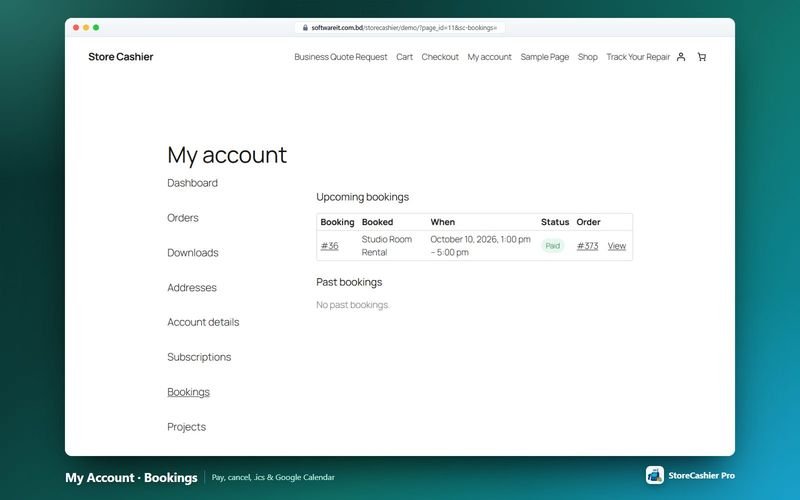
- My Account bookings ProCustomers see upcoming and past bookings with Pay, Cancel (within your rules), .ics download and Add to Google Calendar.
- E-mails and reminders ProNew booking (admin), booking confirmed, booking cancelled and booking reminder e-mails, each with an optional .ics attachment.
- Bookings report ProOccupancy, utilisation, cancellations and no-shows.
Get StoreCashier Pro for $59 $99Unlock every Bookings feature plus all other Pro modules.
How Bookings works
The typical workflow, step by step.
- Create a bookable productChoose the Bookable type and set durations, capacity and costs.
- Define availabilityAdd availability rules, persons and resources.
- PublishThe booking form appears on the product page — or place it anywhere with a shortcode or Elementor widget.
- Customers book and payThey choose a slot, see a live quote and check out with WooCommerce.
- ManageConfirm, reschedule and complete bookings from the calendar; reminders go out automatically.
Bookings screenshots
Real screens from the StoreCashier Pro demo store. Click to enlarge.
Get StoreCashier Pro for $59 $99See it yourself in the live demo (admin / admin), then buy once.
Bookings FAQ
Answers based on the StoreCashier documentation.
Can I sell bookings, appointments or rentals?
Yes, with StoreCashier Pro. It adds bookable products for appointments, rentals, classes and stays as a WooCommerce product type with a My Account tab.
Does the booking form work with the block checkout?
Yes. Slots are held in the cart and re-checked at checkout, and the form works with both classic and block checkout.
Can customers cancel or reschedule?
Customers can cancel from My Account within the product's cancellation rules. Staff can reschedule bookings, which notifies the customer.
Can I take a deposit?
Yes. Each bookable product can take a deposit as a percentage or a fixed amount.
Do I need Elementor for bookings?
No. Elementor is optional; the booking widgets have shortcode equivalents.
More answers in the full FAQ and the documentation.
Get StoreCashier Pro for $59 $99All 20 optional modules plus the advanced POS, multi-location stock and 60 reports.
Related modules
Everything in StoreCashier shares one database, so these modules work together out of the box.
Subscriptions Pro
Sell subscription products with trials, sign-up fees, synchronised renewals, plan switching and customer self-service — plus internal recurring invoices.
Explore Subscriptions →REST API & Integrations Pro
Connect apps, ERPs, mobile apps and automations with scoped API keys and signed webhooks — and bring StoreCashier to your storefront.
Explore REST API & Integrations →Support Tickets Pro
A helpdesk with departments, priorities, SLA tracking, canned replies, a knowledge base and a customer portal in WooCommerce My Account.
Explore Support Tickets →Contacts Free + Pro
Everyone you sell to and buy from — with balances, statements and two-way sync with WooCommerce customers and WordPress users.
Explore Contacts →Accounting Free + Pro
Money follows every transaction: sales, purchases, expenses, payroll and refunds post to the right payment account automatically.
Explore Accounting →
Get StoreCashier Pro for $59
Bookings is included in StoreCashier Pro together with every other module — one plugin, one-time payment.
Start free, upgrade anytime. The free StoreCashier plugin on WordPress.org includes the POS, stock ledger, purchases and accounts, and shows Bookings as a read-only preview marked PRO. Upgrade when you are ready — your data is kept.
Download StoreCashier FreeDemo login: admin / admin · Support · Free version on WordPress.org · Pricing details