
WooCommerce POS Plugin with Barcode & IMEI Support
A full-screen, touch-friendly and keyboard-first register for any desktop, laptop or tablet browser. Every sale is a real WooCommerce order.
Demo login: admin / admin · Support · Free vs Pro · Free version
What POS Register does
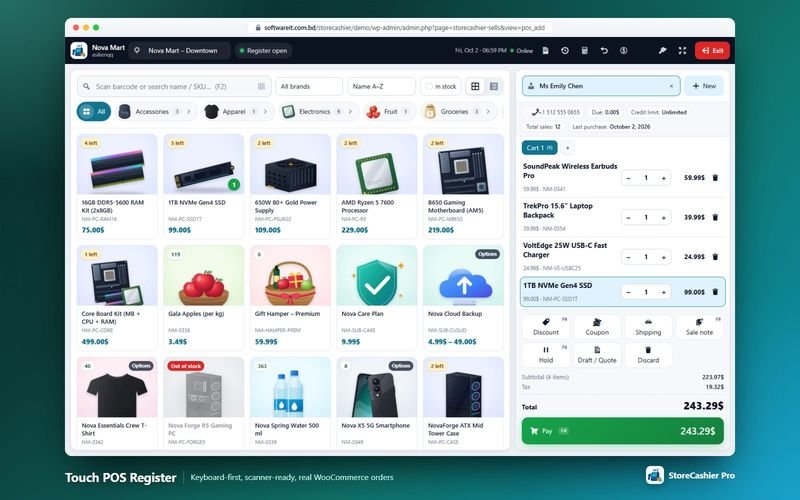
StoreCashier's point of sale (POS) register turns WordPress into a counter till. Cashiers search or scan products, pick a customer, apply discounts and take payment in a single screen. Every POS sale is saved as a genuine WooCommerce order, deducts stock from the register's business location and posts the payment to your payment account — so your online shop and your physical counter share one catalogue, one stock pool and one order history.
The free StoreCashier plugin already includes the barcode POS register with IMEI / serial number selection, discounts, WooCommerce taxes and 80 mm receipts or A4 invoices. StoreCashier Pro adds split payments, hold and recall, multiple carts, drafts and quotations, WooCommerce coupons, cash register sessions, credit sales, cash rounding, a calculator, full keyboard control and a mobile layout.
Availability: Available in the free plugin and in StoreCashier Pro — items marked Pro need StoreCashier Pro.
POS Register features
Free = included in the free StoreCashier plugin on WordPress.org (and in Pro). Pro = StoreCashier Pro only.
Finding and adding products
- Instant search FreeLive search by product name, SKU or barcode. Pressing Enter does an exact lookup by SKU, then the StoreCashier barcode, then the WooCommerce GTIN / EAN field.
- Barcode scanner support FreeAny scanner that types into the browser works. Optional auto-add on an exact match and a configurable quantity per scan.
- Scan anywhere ProFast keystrokes ending with Enter are treated as a scan wherever the cashier is on the screen, so there is no need to focus the search field first.
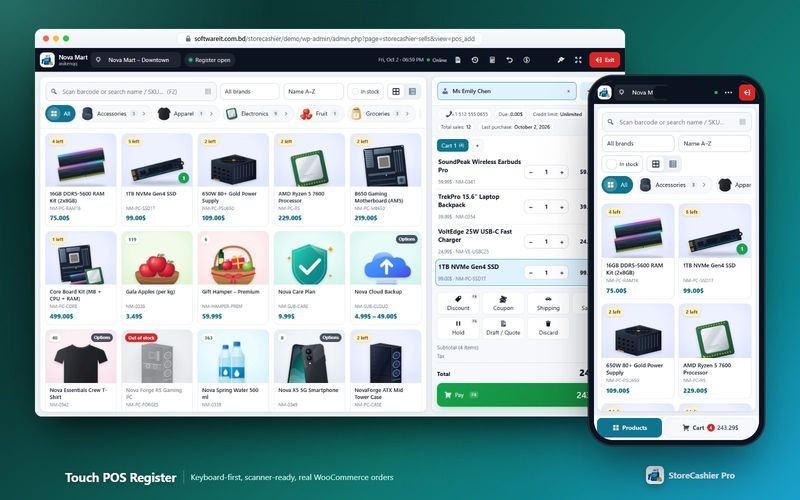
- Product grid or list view FreeCategory chips with breadcrumbs and product counts, a brand filter (when WooCommerce brands exist), sorting by name, best sellers, newest or price, and an “in stock” filter.
- Variation picker FreeVariable products open a dialog showing image, price, stock and SKU for each variation.
- Stock badges FreeCards show “Out of stock”, “3 left” at or below your low-stock threshold, or the quantity on hand.
- IMEI and serial number selection FreeFor serial-tracked products the cashier picks, scans or types the exact unit being sold — one cart line per unit.
- Location-aware catalogue ProProducts assigned to specific business locations only appear at the registers of those locations.
Cart, customers, prices and discounts
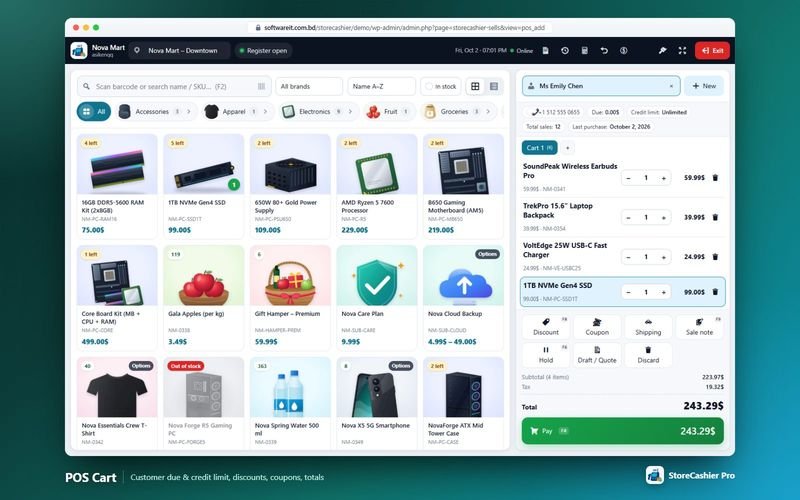
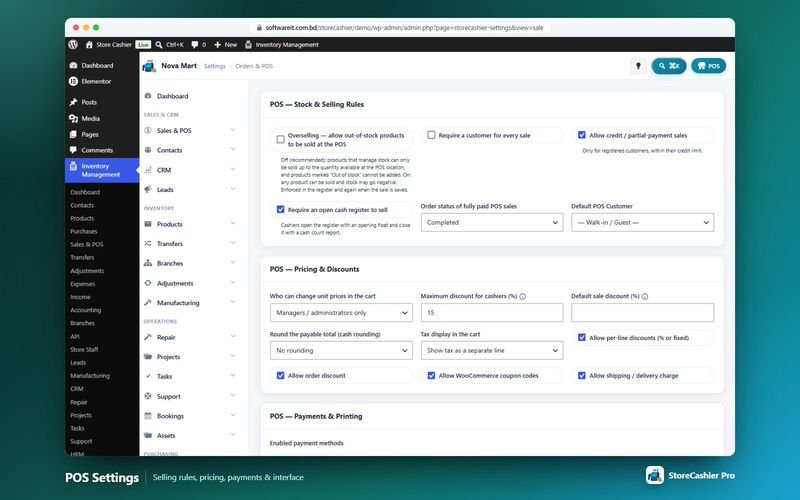
- Line and order discounts FreeFixed or percentage discounts per line or on the whole order, with a maximum discount for cashiers enforced in the browser and again on the server.
- Unit price editing control FreeA setting decides who may change unit prices in the cart: managers only, every cashier, or nobody.
- WooCommerce taxes FreeTaxes come from your WooCommerce tax settings and are shown including or excluding tax.
- Walk-in or required customer FreeSell to a default walk-in customer or require a customer for every sale.
- Customer panel and quick-add ProSearch customers by name, phone, e-mail, contact ID or business name and see their due, credit limit, total sales and last purchase. Alt+N creates a new customer in a popup.
- WooCommerce coupons ProAny WooCommerce coupon code, validated immediately for existence, expiry, usage limit and minimum / maximum spend.
- Shipping charges and sale notes ProAdd a delivery charge as a WooCommerce shipping line and a sale note that can be printed on the receipt.
- Multiple carts ProServe several customers at once with Cart 1, Cart 2… tabs that are saved in the browser and survive a reload.
- Hold, drafts and quotations ProPark a sale (HLD-…), save a draft (DRF-…) or a printable quotation (QUO-…) with a validity note, and recall them later with F7.
Payments and stock rules
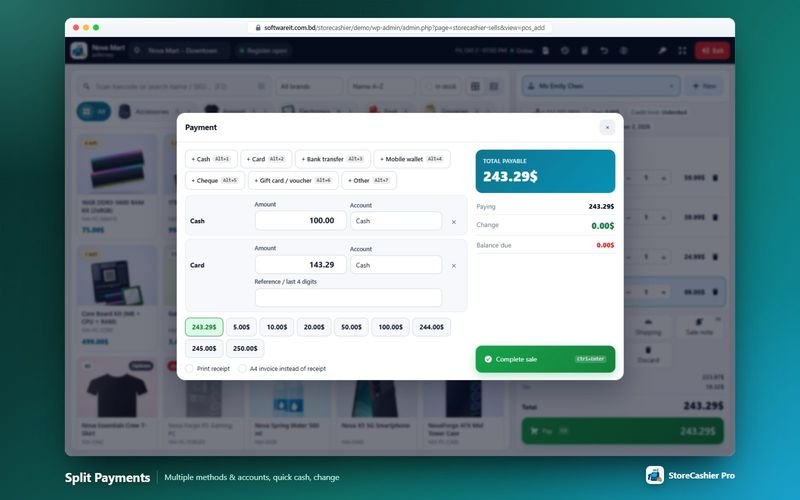
- Payment methods FreeCash, card, bank transfer, mobile wallet, cheque and other, with quick-cash buttons and automatic change due.
- Payments posted to your accounts FreeEach payment is recorded to the payment account you choose, so the cash drawer and bank balances stay correct.
- Overselling setting FreeAllow or block selling beyond the stock available at the register's location. The rule is checked in the register and again when the sale is saved.
- Split payments ProPay one sale with several methods and accounts (Alt+1 … Alt+9), including gift card / voucher, with a reference or last 4 digits for non-cash lines.
- Credit sales ProLeave a balance due for a registered customer, within that customer's credit limit or the default credit limit.
- Cash rounding ProRound the payable total to 0.05, 0.10, 0.50 or 1.00.
Receipts, register sessions and speed
- 80 mm receipt or A4 invoice FreePrint a thermal receipt or a full invoice with your logo and business details, optionally automatically after each sale.
- Recent sales and reprint FreeReprint the receipt or invoice of a recent sale at any time.
- Register themes and sounds FreeLight, dark or automatic register theme and optional sounds.
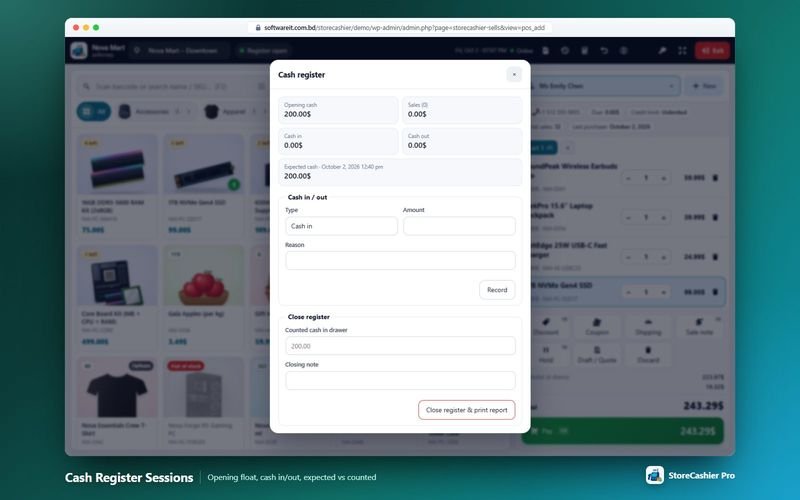
- Cash register sessions ProOpen a register with an opening float, record cash in / cash out with a reason, and close with expected vs counted cash and a printable closing report. You can require an open register before selling.
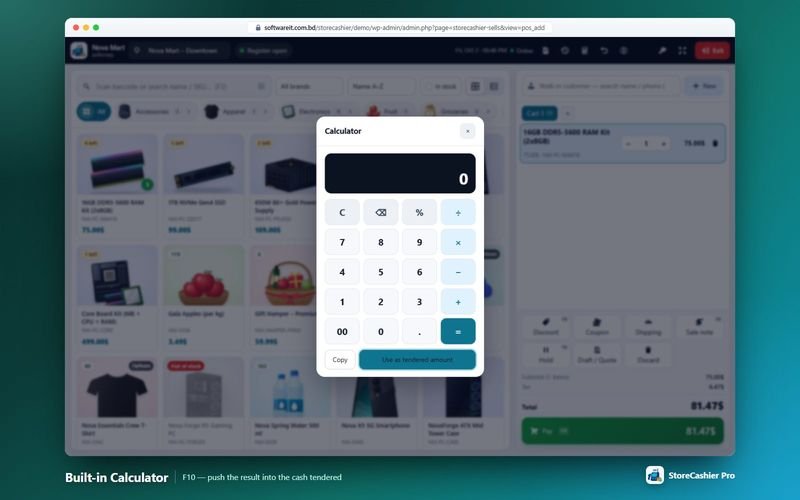
- Built-in calculator ProF10 opens a calculator; “Use as tendered amount” fills the cash line of the payment dialog.
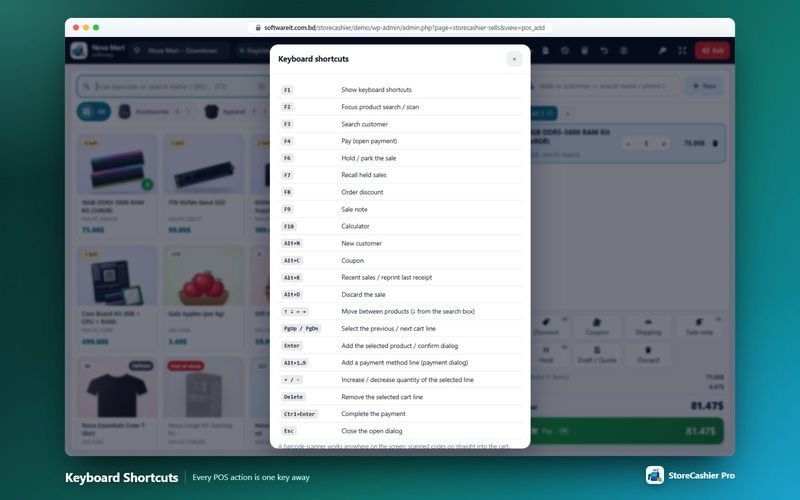
- Full keyboard control ProF1–F10 and Alt shortcuts for search, customer, pay, hold, recall, discount, note, calculator and more.
- Mobile layout ProOn narrow screens tool buttons collapse into a menu and a bottom bar switches between Products and Cart.
- Online register with safe carts FreeThe POS needs a connection to complete a sale. If the connection drops, Pay is disabled and carts are kept in the browser so nothing is lost.
Get StoreCashier Pro for $59 $99Unlock every POS Register feature plus all other Pro modules.
POS keyboard shortcuts Pro
Every POS action is reachable from the keyboard. Press F1 inside the register to see the map.
| Key | Action | Key | Action |
|---|---|---|---|
| F1 | Show keyboard shortcuts | F7 | Recall held sales |
| F2 | Focus product search / scan | F8 | Order discount |
| F3 | Search customer | F9 | Sale note |
| F4 | Pay (open payment) | F10 | Calculator |
| F6 | Hold / park the sale | Ctrl+Enter | Complete the payment |
| Alt+N | New customer | Alt+C | Coupon |
| Alt+R | Recent sales / reprint | Alt+D | Discard the sale |
| Alt+1…9 | Add a payment method line | + / − | Change quantity of the selected line |
What a POS sale creates
A POS sale creates a WooCommerce order (created via storecashier_pos) with the business location, cashier, customer, register and payment details. When it is fully paid the order status is Completed (or Processing, per your settings); with a balance due it is On hold. Stock is deducted from the POS location, a sales ledger record and the account credits are created, and an activity-log entry is written.
How POS Register works
The typical workflow, step by step.
- Choose the location and open the registerSelect the business location (only the locations the cashier is assigned to are listed) and, in Pro, open a cash register session with an opening float.
- Scan or search productsScan a barcode anywhere on the screen or search by name, SKU or barcode; pick a variation or the exact IMEI / serial unit when needed.
- Pick the customer and adjust the cartChoose a walk-in or registered customer, change quantities, apply line or order discounts, coupons, shipping and notes.
- Take paymentPress Pay (F4), enter cash with quick-cash buttons or split the payment across methods and accounts, then complete the sale (Ctrl+Enter).
- Print and carry onPrint an 80 mm receipt or an A4 invoice. The sale is already a WooCommerce order with stock deducted and the payment posted.
POS Register screenshots
Real screens from the StoreCashier Pro demo store. Click to enlarge.
Get StoreCashier Pro for $59 $99See it yourself in the live demo (admin / admin), then buy once.
POS Register FAQ
Answers based on the StoreCashier documentation.
Does the POS create real WooCommerce orders?
Yes. Every POS sale is created as a WooCommerce order and flagged as a POS sale, so online and counter sales share the same products, stock and order history. The payment is recorded to the payment account you choose.
Which devices can run the POS?
The register runs in a modern browser on a desktop, laptop or tablet as a full-screen, touch-friendly screen with a light, dark or automatic theme. A mobile layout is included in StoreCashier Pro.
Does the POS work offline?
No. The POS is an online register and needs a connection to the site to complete a sale. If the connection drops, Pay is disabled and the carts are kept in the browser until the connection returns.
Can I use a barcode scanner and a thermal printer?
Yes. Any scanner that types into the browser works, and products are matched by barcode, SKU, name or product ID. Receipts print on 80 mm thermal printers or as A4 invoices.
Can cashiers change prices or give discounts?
You decide. A setting controls who may edit unit prices (managers only, every cashier or nobody), and a maximum discount for cashiers limits line and order discounts.
Can I sell products that are out of stock?
Only if you allow it. With the Overselling setting off, a product can only be sold up to the quantity available at the register's location; the rule is checked in the register and again when the sale is saved.
What does StoreCashier Pro add to the POS?
Split payments, hold and recall, multiple carts, drafts and printable quotations, WooCommerce coupons, shipping charges, cash register sessions with opening float and closing report, a calculator, full keyboard shortcuts, quick-add customer, credit sales, cash rounding and a mobile layout.
More answers in the full FAQ and the documentation.
Get StoreCashier Pro for $59 $99All 20 optional modules plus the advanced POS, multi-location stock and 60 reports.
Related modules
Everything in StoreCashier shares one database, so these modules work together out of the box.
Inventory Free + Pro
Know your stock down to the product, variation, location and lot — with every movement recorded in an append-only ledger and synced to WooCommerce.
Explore Inventory →IMEI & Serial Tracking Free + Pro
Follow every phone, laptop or device by its IMEI or serial number — from purchase to sale, return and repair.
Explore IMEI & Serial Tracking →Sales & Orders Free + Pro
Website orders and POS sales in one list — with invoices, packing slips, payments, profit, returns and notifications.
Explore Sales & Orders →Multi-location & Staff Free + Pro
Shops, warehouses and branches with their own stock, registers, staff and accounts — compared side by side.
Explore Multi-location & Staff →Accounting Free + Pro
Money follows every transaction: sales, purchases, expenses, payroll and refunds post to the right payment account automatically.
Explore Accounting →
Get StoreCashier Pro for $59
POS Register is included in StoreCashier Pro together with every other module — one plugin, one-time payment.
Start free, upgrade anytime. 17 of the POS Register features on this page are already in the free StoreCashier plugin on WordPress.org. Install it at no cost, then upgrade to Pro — your data is kept.
Download StoreCashier FreeDemo login: admin / admin · Support · Free version on WordPress.org · Pricing details