
WooCommerce Reports & Analytics: 60 Reports + Report Builder
A dashboard that respects permissions, 60 built-in reports in StoreCashier Pro and a Report Builder that pins your own charts to the dashboard.
Demo login: admin / admin · Support · Free vs Pro · Free version
What Reports does
StoreCashier reports read from the same ledger as the POS, purchases and accounts, so the numbers agree. The free plugin includes the dashboard with KPI cards, sales charts, top products and customers and low-stock alerts, plus profit / loss, daily and monthly sales summary, payment method summary, product purchase, product sell, items, stock and IMEI / serial reports.
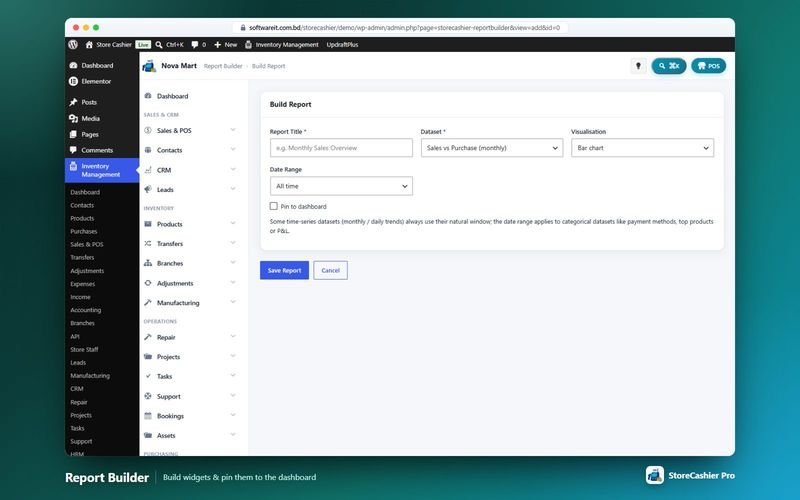
StoreCashier Pro includes 60 built-in reports across sales, purchases and stock, finance and every module, and a Report Builder that turns datasets into bar, line, pie, table or KPI widgets you can pin to the dashboard. Most reports share one filter bar with date ranges and a business-location filter, and every table can be searched, printed and exported to CSV or Excel.
Availability: Available in the free plugin and in StoreCashier Pro — items marked Pro need StoreCashier Pro.
Reports features
Free = included in the free StoreCashier plugin on WordPress.org (and in Pro). Pro = StoreCashier Pro only.
Dashboard
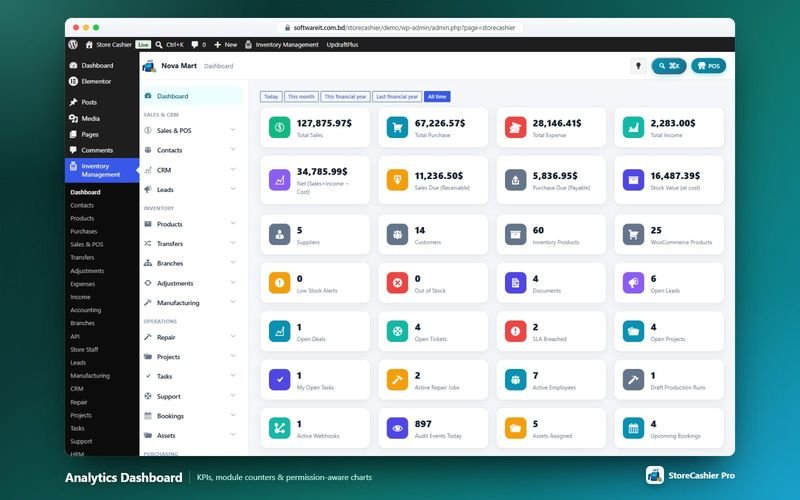
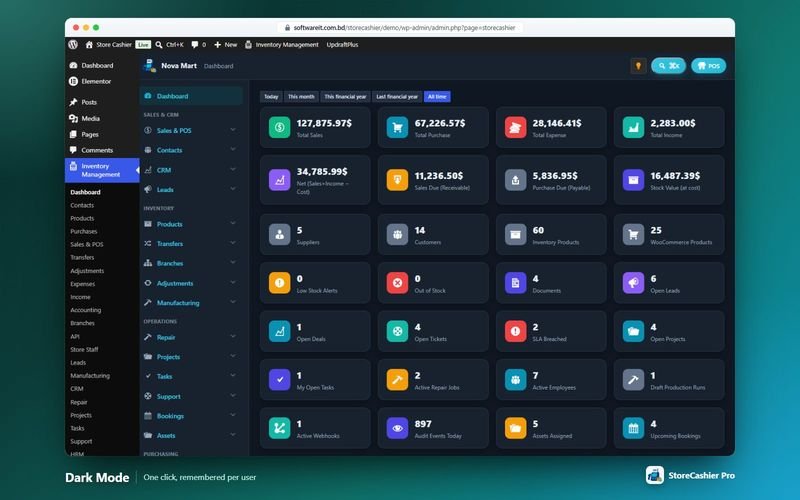
- KPI cards FreeSales, purchases, receivables, payables and stock value, with sales charts, top products and customers and low-stock alerts.
- Module counters ProPending approvals, open leads and deals, contract renewals due, open tickets, SLA breaches, open projects, my open tasks, active repair jobs, pending leave and more.
- Twelve permission-aware charts ProSales vs purchase, sales by payment method, sales trend, orders by status, profit / loss breakdown, income vs expense, top products, expenses by category, sales by location, top customers, sales by representative and tax summary.
Reports in the free plugin
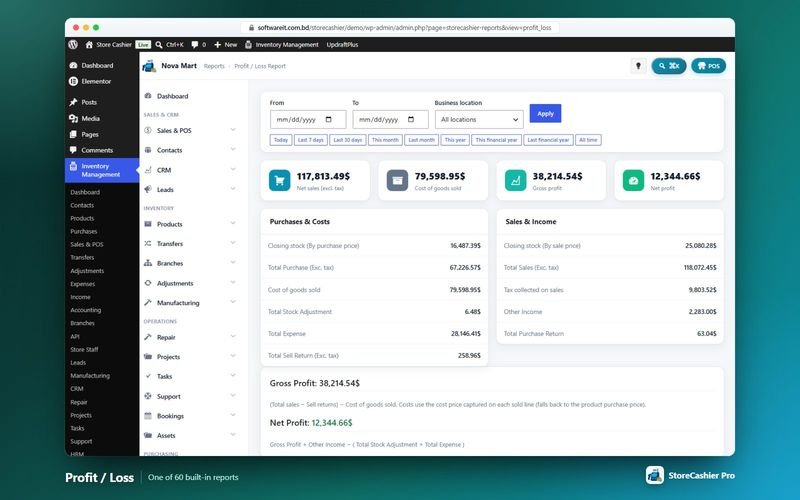
- Profit / loss FreeNet sales, cost of goods, gross profit, expenses and net profit.
- Sales summaries FreeDaily / monthly sales summary and payment method summary.
- Product purchase, product sell and items FreeWhat was bought and sold, line by line, with cost and profit.
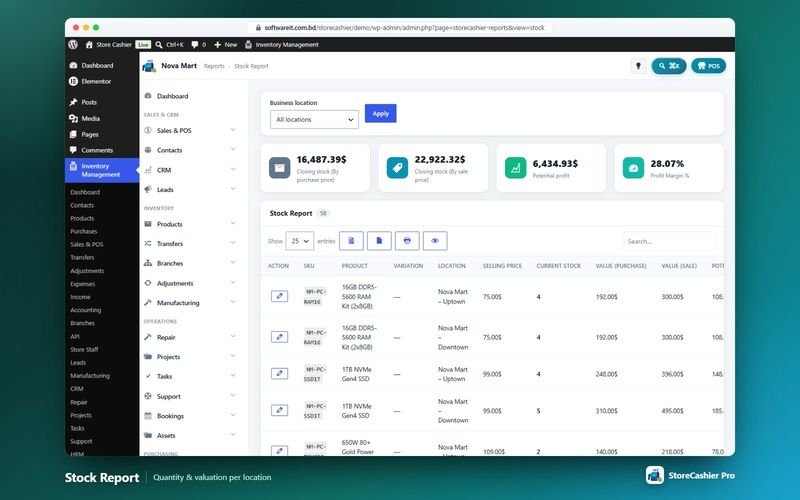
- Stock report FreeStock per product with valuation.
- IMEI / serial number report FreeThe full history of every serial-tracked unit.
- Financial-year ranges and exports FreeFinancial-year date ranges; every table can be printed and exported to CSV or Excel.
Sales reports (Pro)
- Sales analysis ProProduct profit, category and brand sales, trending products, sell payments, sell returns, customer groups and top customers.
- People and registers ProSales representative, staff / cashier performance and the POS register report with daily takings per cashier and location.
- Tax and ledgers ProOutput vs input tax net of returns with monthly breakdown, and a supplier & customer ledger summary.
Purchase, stock and finance reports (Pro)
- Purchasing ProPurchase payments, purchase returns and purchase & sale.
- Stock ProStock valuation at cost and retail, low stock / reorder with suggested quantity, expiry, lot, stock adjustment and stock transfer.
- Finance ProExpense, income and subscriptions (MRR, ARR, churn, trial conversion), plus trial balance and cash flow.
Module reports (Pro)
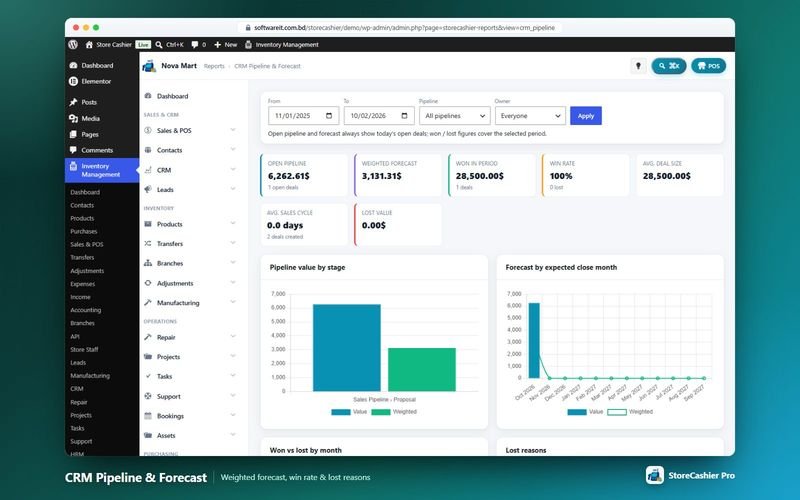
- CRM and leads ProCRM pipeline & forecast and leads conversion with source ROI.
- Operations ProSupport tickets (SLA compliance, CSAT), projects summary, task productivity, bookings (occupancy, cancellations, no-shows), approvals summary, document expiry and audit activity.
- HR, assets, manufacturing and repair ProFour HR reports, five asset reports, five manufacturing reports and six repair reports.
Report Builder (Pro)
- 13 datasets ProSales vs purchase, income vs expense, daily sales trend, sales and purchases by payment method, orders by status, top products, top customers, sales by location, expenses by category, sales by representative, profit / loss breakdown and tax summary.
- Five visualisations ProBar, line, pie, table or KPI cards, with date ranges from today to this year or custom.
- Pin to the dashboard ProPinned reports appear as dashboard widgets (up to 8 by default); each report only shows data the viewer may see.
Get StoreCashier Pro for $59 $99Unlock every Reports feature plus all other Pro modules.
How Reports works
The typical workflow, step by step.
- Open the dashboardSee KPIs, charts and alerts for the locations you can access.
- Pick a reportChoose a report and a date range (today, last 7 / 30 days, this month, this year…).
- Filter by locationNarrow to one shop or warehouse, or see all of them.
- Export or printExport any table to CSV or Excel, or print it.
- Build your ownCreate a chart in the Report Builder and pin it to the dashboard (Pro).
Reports screenshots
Real screens from the StoreCashier Pro demo store. Click to enlarge.
Get StoreCashier Pro for $59 $99See it yourself in the live demo (admin / admin), then buy once.
Reports FAQ
Answers based on the StoreCashier documentation.
What reports are included?
The free edition includes the dashboard, profit / loss, daily / monthly sales summary, payment method summary, product purchase, product sell, items, stock and IMEI / serial reports. StoreCashier Pro includes 60 built-in reports and a Report Builder.
Can I export reports?
Yes. Every report table can be searched, printed and exported to CSV or Excel.
Can I build my own reports?
StoreCashier Pro includes a Report Builder: choose a dataset, a chart type (bar, line, pie, table or KPI cards) and a date range, then pin the result to the dashboard.
Do reports respect staff permissions?
Yes. Report access follows permissions and assigned business locations, and module reports only appear when the module is switched on.
Will imported old orders appear in reports?
Yes. Orders placed before installation are imported into the sales reports with the business location “Not selected”, without changing stock.
More answers in the full FAQ and the documentation.
Get StoreCashier Pro for $59 $99All 20 optional modules plus the advanced POS, multi-location stock and 60 reports.
Related modules
Everything in StoreCashier shares one database, so these modules work together out of the box.
Accounting Free + Pro
Money follows every transaction: sales, purchases, expenses, payroll and refunds post to the right payment account automatically.
Explore Accounting →Inventory Free + Pro
Know your stock down to the product, variation, location and lot — with every movement recorded in an append-only ledger and synced to WooCommerce.
Explore Inventory →Sales & Orders Free + Pro
Website orders and POS sales in one list — with invoices, packing slips, payments, profit, returns and notifications.
Explore Sales & Orders →CRM & Leads Pro
From the first web-form submission to a signed contract and a WooCommerce order — pipelines, proposals, contracts and lead scoring in one place.
Explore CRM & Leads →HRM & Payroll Pro
From hiring to payslip: employees, attendance, leave, payroll, performance, recruitment, training and an employee portal in WooCommerce My Account.
Explore HRM & Payroll →
Get StoreCashier Pro for $59
Reports is included in StoreCashier Pro together with every other module — one plugin, one-time payment.
Start free, upgrade anytime. 7 of the Reports features on this page are already in the free StoreCashier plugin on WordPress.org. Install it at no cost, then upgrade to Pro — your data is kept.
Download StoreCashier FreeDemo login: admin / admin · Support · Free version on WordPress.org · Pricing details