
StoreCashier Free vs Pro: Feature Comparison
Start with the free StoreCashier plugin — fully functional for a single store, free forever. StoreCashier Pro adds the advanced POS, multi-location stock and every business module on the same database.
Demo login: admin / admin · Documentation · Support
Two editions, one system
StoreCashier (free) is available on WordPress.org. It includes the POS register, stock ledger, products, barcodes and labels, opening stock, purchases, IMEI / serial tracking, orders and invoices, contacts with WooCommerce sync, payment accounts, a balance sheet, core reports, POS staff and the Quick Setup wizard — for one business location — with no time limits and no trial code.
StoreCashier Pro is a separate, commercial plugin sold by Software IT for $59 (regular price $99). It adds the advanced POS, multi-location stock, transfers, adjustments, returns, expenses and income, trial balance and cash flow, product and order editors, CRM, leads, HRM and payroll, bookings, subscriptions, support tickets, projects, tasks, repair, manufacturing, assets, approvals, documents, audit trail, roles, notifications, REST API, webhooks, the Report Builder and 60 reports.
Every Pro module is visible in the free plugin as a read-only preview marked PRO, so you can see how it looks before you upgrade. Previews never change your data.
Complete feature comparison
| Feature | Free · $0 | Pro · $59 |
|---|---|---|
| Point of Sale | ||
| Full-screen barcode POS register (grid / list, search, variations) | ✓ | ✓ |
| IMEI / serial selection at the register | ✓ | ✓ |
| Line and order discounts, max cashier discount, price-edit control | ✓ | ✓ |
| Cash, card, bank, wallet, cheque payments with change due | ✓ | ✓ |
| 80 mm receipts or A4 invoices, reprint recent sales | ✓ | ✓ |
| Overselling setting enforced in register and on save | ✓ | ✓ |
| Split payments across methods and accounts | — | ✓ |
| Hold and recall, multiple carts, drafts and quotations | — | ✓ |
| WooCommerce coupons, shipping charges and sale notes | — | ✓ |
| Cash register sessions with closing report | — | ✓ |
| Credit sales, cash rounding and calculator | — | ✓ |
| Full keyboard control, quick-add customer and mobile layout | — | ✓ |
| Inventory | ||
| Append-only stock ledger and product stock history | ✓ | ✓ |
| Units, barcode and SKU tools, label printing | ✓ | ✓ |
| Opening stock on screen or by CSV (lot, expiry, serials) | ✓ | ✓ |
| Sync all WooCommerce products and bulk stock tools | ✓ | ✓ |
| Stock per business location | — | ✓ |
| Stock transfers and stock adjustments | — | ✓ |
| In-plugin product editor for every product type | — | ✓ |
| StoreCashier columns in WooCommerce CSV import / export | — | ✓ |
| Purchasing | ||
| Purchases with lots, landed cost, part payments and due dates | ✓ | ✓ |
| IMEI / serials on purchases, attachments, printable PO | ✓ | ✓ |
| Shipping status, carrier and tracking | — | ✓ |
| Purchase returns (debit notes) with supplier refunds | — | ✓ |
| Sales & orders | ||
| All orders (checkout + POS) with invoices and packing slips | ✓ | ✓ |
| Automatic stock deduction at chosen statuses | ✓ | ✓ |
| Safe import of existing orders without stock moves | ✓ | ✓ |
| In-plugin order editor | — | ✓ |
| Sell returns (credit notes); WooCommerce refunds mirrored | — | ✓ |
| E-mail, SMS and WhatsApp order notifications with PDF invoice | — | ✓ |
| Contacts | ||
| Customer and supplier profiles, balances and statements | ✓ | ✓ |
| Two-way sync with WooCommerce customers and WordPress users | ✓ | ✓ |
| Custom fields and quick-add popups | — | ✓ |
| Accounting | ||
| Payment accounts, account book, deposits, withdrawals, fund transfers | ✓ | ✓ |
| Balance sheet and payment account report | ✓ | ✓ |
| Trial balance and cash flow statement | — | ✓ |
| Expenses and income with recurring entries | — | ✓ |
| Reports | ||
| Dashboard, profit / loss, sales summaries, stock and IMEI reports | ✓ | ✓ |
| CSV / Excel export, print and financial-year ranges | ✓ | ✓ |
| 60 built-in reports | — | ✓ |
| Report Builder with dashboard widgets | — | ✓ |
| Business modules | ||
| CRM: pipelines, proposals, estimates, contracts | — | ✓ |
| Leads: scoring, web-to-lead forms, import, source ROI | — | ✓ |
| HRM & Payroll with employee portal | — | ✓ |
| Bookings and appointments | — | ✓ |
| Subscriptions and recurring billing | — | ✓ |
| Support tickets with SLA and customer portal | — | ✓ |
| Projects, tasks, timesheets and Gantt | — | ✓ |
| Repair shop management | — | ✓ |
| Manufacturing with BOM and MRP | — | ✓ |
| Fixed assets with depreciation | — | ✓ |
| Locations, staff & workflow | ||
| One business location | ✓ | ✓ |
| POS staff and payment-account limits | ✓ | ✓ |
| Multiple locations, branch P&L and stock requests | — | ✓ |
| Custom roles with permission matrix and location scoping | — | ✓ |
| Approvals, document library and audit trail | — | ✓ |
| Platform | ||
| WooCommerce-native, HPOS and Cart / Checkout blocks compatible | ✓ | ✓ |
| Quick Setup wizard, light and dark admin themes | ✓ | ✓ |
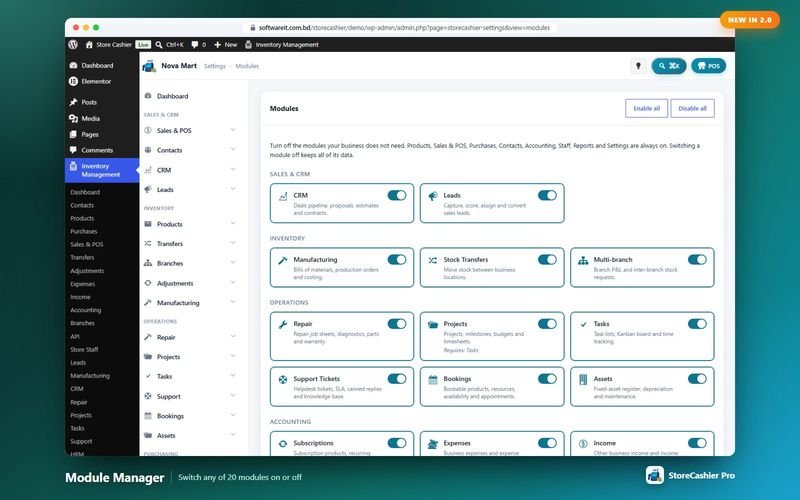
| Module manager to switch modules on or off | — | ✓ |
| Command palette, quick-add popups and custom fields | — | ✓ |
| REST API and HMAC-signed webhooks | — | ✓ |
| Elementor widgets, shortcodes and My Account tabs | — | ✓ |
Get StoreCashier Pro for $59 $99All 20 optional modules plus the advanced POS, multi-location stock and 60 reports.
Upgrading from free to Pro
StoreCashier Pro is installed like any other plugin. Activating it safely deactivates the free edition and continues with the same storecashier_ database tables and settings, so all existing data — products, stock movements, purchases, contacts, payments and reports — remains available. Database upgrades run automatically. If you ever go back to the free edition, your data is still there.
Which edition do I need?
Choose the free plugin if you run one shop and need a barcode POS, an exact stock ledger, purchases, customers and suppliers, payment accounts and core reports. Choose StoreCashier Pro if you need several locations, advanced POS tools such as split payments and register sessions, or any business module: CRM, HR and payroll, bookings, subscriptions, support, projects, repair, manufacturing, assets, approvals or the REST API.
Pick your edition
StoreCashier Free
POS & inventory for one WooCommerce store
Free forever on WordPress.org. No time limit, no trial code.
Download Free- Full-screen barcode POS register
- IMEI / serial number tracking
- Append-only stock ledger and stock history
- Products, units, barcodes and label printing
- Opening stock on screen or by CSV
- Purchases and supplier payments
- Orders, invoices and receipts
- Contacts with WooCommerce and WordPress sync
- Payment accounts and balance sheet
- Core reports and dashboard
- POS staff and Quick Setup wizard
- One business location, no time limit
Every Pro module is visible as a read-only preview. Compare Free vs Pro
StoreCashier Pro
The complete WooCommerce POS, inventory & business suite
Regular price $99 — now $59. One-time payment. Save $40
Get StoreCashier Pro for $59Everything in Free, plus:
- Advanced POS: split payments, hold & recall, multiple carts, quotations, cash register sessions, credit sales
- Multi-location stock, transfers, adjustments and branch P&L
- Product editor, order editor, sell and purchase returns
- Expenses, income, trial balance and cash flow
- CRM, leads, HRM & payroll, bookings and subscriptions
- Support tickets, projects & tasks, repair, manufacturing and fixed assets
- Approvals, documents, audit trail, roles and notifications
- REST API, webhooks, Elementor widgets, shortcodes and My Account tabs
- 60 built-in reports and the Report Builder
- Same database as the free plugin — your data is kept
Explore each area
POS Register Free + Pro
A full-screen, touch-friendly and keyboard-first register for any desktop, laptop or tablet browser. Every sale is a real WooCommerce order.
Explore POS Register →Inventory Free + Pro
Know your stock down to the product, variation, location and lot — with every movement recorded in an append-only ledger and synced to WooCommerce.
Explore Inventory →Purchasing Free + Pro
Buy stock from suppliers with lots, landed costs, part payments and due dates — stock is added only when goods are received.
Explore Purchasing →Sales & Orders Free + Pro
Website orders and POS sales in one list — with invoices, packing slips, payments, profit, returns and notifications.
Explore Sales & Orders →Contacts Free + Pro
Everyone you sell to and buy from — with balances, statements and two-way sync with WooCommerce customers and WordPress users.
Explore Contacts →Accounting Free + Pro
Money follows every transaction: sales, purchases, expenses, payroll and refunds post to the right payment account automatically.
Explore Accounting →Reports Free + Pro
A dashboard that respects permissions, 60 built-in reports in StoreCashier Pro and a Report Builder that pins your own charts to the dashboard.
Explore Reports →CRM & Leads Pro
From the first web-form submission to a signed contract and a WooCommerce order — pipelines, proposals, contracts and lead scoring in one place.
Explore CRM & Leads →HRM & Payroll Pro
From hiring to payslip: employees, attendance, leave, payroll, performance, recruitment, training and an employee portal in WooCommerce My Account.
Explore HRM & Payroll →Bookings Pro
Bookable WooCommerce products by minutes, hours, days or nights — with resources, persons, deposits, a calendar and customer self-service.
Explore Bookings →Subscriptions Pro
Sell subscription products with trials, sign-up fees, synchronised renewals, plan switching and customer self-service — plus internal recurring invoices.
Explore Subscriptions →Support Tickets Pro
A helpdesk with departments, priorities, SLA tracking, canned replies, a knowledge base and a customer portal in WooCommerce My Account.
Explore Support Tickets →Projects & Tasks Pro
Plan, staff, track and invoice client or internal projects — with a full task manager, timers, timesheets and a customer portal.
Explore Projects & Tasks →Repair Shop Pro
Job sheets for phone, computer and device repair shops — intake checklist, estimates with customer approval, parts from stock, invoicing and warranty.
Explore Repair Shop →Manufacturing Pro
Multi-level bills of materials, production orders with job cards and quality checks, material planning and actual-cost posting into the stock ledger.
Explore Manufacturing →Fixed Assets Pro
An asset register with custody, transfers, maintenance schedules, three depreciation methods, disposal with gain or loss and QR / barcode labels.
Explore Fixed Assets →Multi-location & Staff Free + Pro
Shops, warehouses and branches with their own stock, registers, staff and accounts — compared side by side.
Explore Multi-location & Staff →Approvals, Documents & Audit Pro
Your team, your rules, your paper trail: approvals with conditions and escalation, versioned documents and a field-level audit trail.
Explore Approvals, Documents & Audit →REST API & Integrations Pro
Connect apps, ERPs, mobile apps and automations with scoped API keys and signed webhooks — and bring StoreCashier to your storefront.
Explore REST API & Integrations →IMEI & Serial Tracking Free + Pro
Follow every phone, laptop or device by its IMEI or serial number — from purchase to sale, return and repair.
Explore IMEI & Serial Tracking →Free vs Pro FAQ
What is the difference between StoreCashier and StoreCashier Pro?
The free plugin on WordPress.org covers the POS register, stock ledger, products, barcodes and labels, opening stock, purchases, IMEI / serial tracking, orders and invoices, contacts with sync, payment accounts, balance sheet, core reports and POS staff for one business location. StoreCashier Pro adds the advanced POS, multi-location stock and every business module.
What happens if I upgrade to StoreCashier Pro?
StoreCashier Pro is a separate plugin. Activating it deactivates the free edition and continues with the same StoreCashier tables and settings, so all data is kept. If you later go back to the free edition, your data is still there.
What are the screens marked PRO in the free plugin?
They are read-only previews of StoreCashier Pro modules, so you can see how each one looks before deciding to upgrade. Saving or processing is only available in StoreCashier Pro, and previews never change your data.
Can I switch off modules I do not need?
In StoreCashier Pro, Settings → Modules switches optional modules on or off. A disabled module disappears from menus, the REST API, My Account and widgets, but its data is kept.
Can I try it before buying?
Yes. Log in to the live demo (username admin, password admin) or install the free StoreCashier plugin from WordPress.org, where every Pro module is visible as a read-only preview.
Get StoreCashier Pro for $59 $99All 20 optional modules plus the advanced POS, multi-location stock and 60 reports.

Get StoreCashier Pro for $59
One plugin for your counter, stock, books, customers, team and services — built on WooCommerce.
Start free, upgrade anytime. Install the free StoreCashier plugin from WordPress.org today; upgrade to Pro whenever you need more — your data is kept.
Download StoreCashier FreeDemo login: admin / admin · Support · Free version on WordPress.org · Pricing details