
WooCommerce Accounting Plugin: Accounts, Expenses & Statements
Money follows every transaction: sales, purchases, expenses, payroll and refunds post to the right payment account automatically.
Demo login: admin / admin · Support · Free vs Pro · Free version
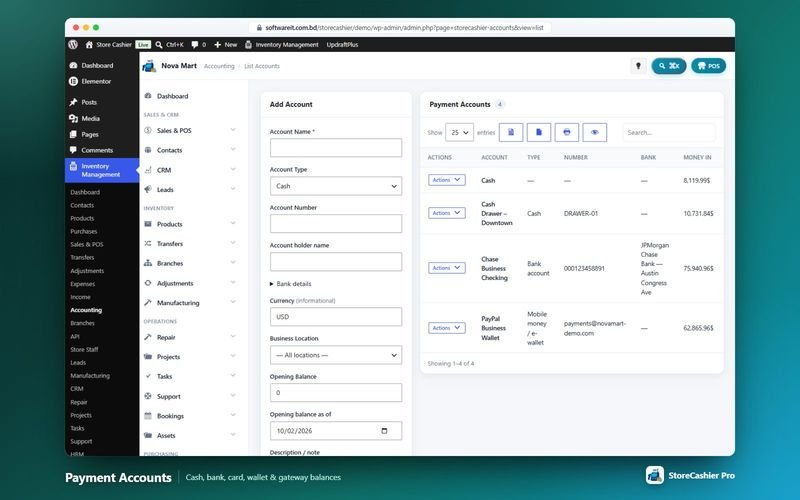
What Accounting does
StoreCashier keeps your cash drawers, bank accounts, cards and mobile wallets in step with the business. Each payment account has an account book with deposits, withdrawals, fund transfers and a running balance, and every sale and purchase payment is posted to it automatically. Default accounts catch money received or paid without a chosen account, and a tool links older payments to the right account.
The free plugin includes payment accounts, account books, fund transfers, a balance sheet and a payment account report. StoreCashier Pro adds a trial balance, a cash flow statement and categorised expenses and income with payees, tax, attachments and recurring entries, and posts payroll, repair, asset, project and register cash movements to your accounts.
Availability: Available in the free plugin and in StoreCashier Pro — items marked Pro need StoreCashier Pro.
Accounting features
Free = included in the free StoreCashier plugin on WordPress.org (and in Pro). Pro = StoreCashier Pro only.
Payment accounts and account book
- Payment accounts FreeCash, bank, card and mobile wallet accounts with opening balances and bank details.
- Account book FreePer account: opening balance, money in, money out, closing balance and a ledger with type, linked reference, contact, user and running balance.
- Deposits, withdrawals and fund transfers FreeRecord deposits and withdrawals; fund transfers create and delete both sides together.
- Default accounts and link tool FreeDefault accounts for money without a chosen account, and a tool that links unassigned payments to an account.
- More account types and context defaults ProSavings, payment gateway / merchant and loan / credit line accounts, plus default accounts for online orders, POS cash in/out, repair payments, assets, transfer shipping and project expenses.
Financial statements
- Balance sheet FreeAssets (cash and bank accounts, closing stock at cost, receivables) against liabilities and equity (payables, owner equity).
- Payment account report FreeThe ledger of a single account with balance.
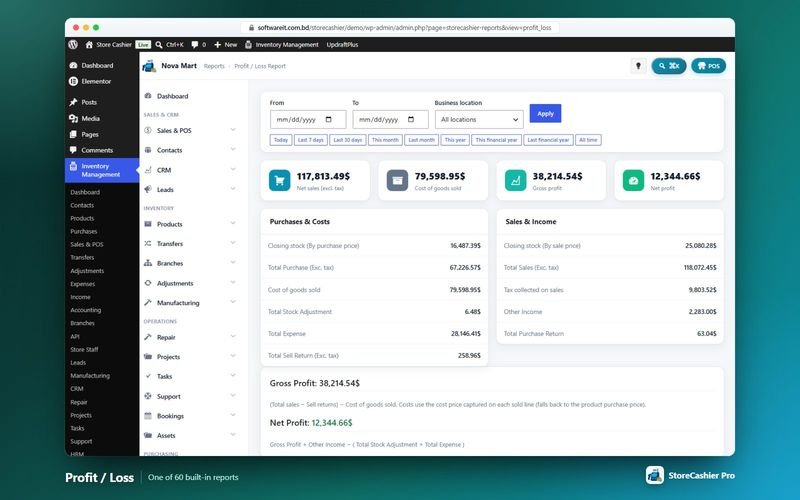
- Profit / loss FreeNet sales, cost of goods, gross profit, expenses and net profit.
- Trial balance ProMoney in, money out and debit / credit balance per account, linked to the account book.
- Cash flow statement ProCash in, cash out and net cash flow for a period, grouped into operating, investing and financing.
Expenses and income
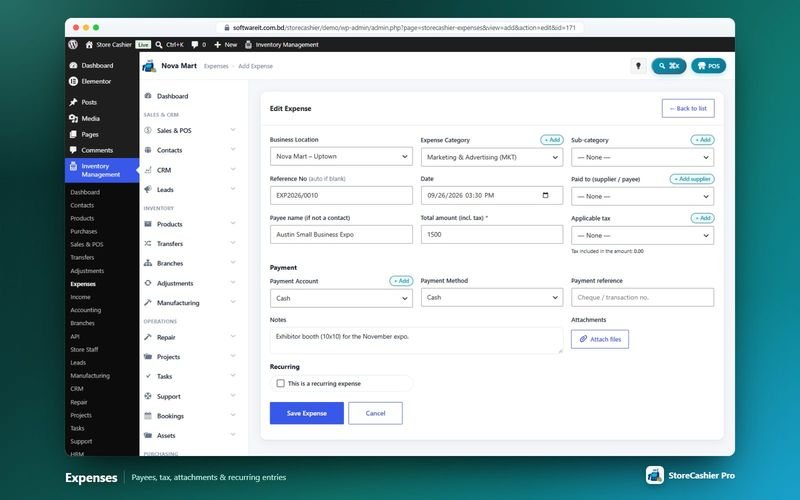
- Categorised expenses and income ProCategories and sub-categories, payee or customer, location, reference with EXP / INC prefixes and date.
- Tax and attachments ProTotal amount including tax, the applicable tax, payment account, method, reference, notes and attachments.
- Recurring entries ProRepeat every N days, weeks, months or years for a number of repetitions or until stopped; a daily task creates the entries.
- Expense and income reports ProExpense report by category and an income report.
- Automatic postings from modules ProPayroll, repairs, assets, stock transfer shipping, project expenses and register cash moves post to the payment-account ledger.
Get StoreCashier Pro for $59 $99Unlock every Accounting feature plus all other Pro modules.
How Accounting works
The typical workflow, step by step.
- Add your accountsCreate cash, bank, card and wallet accounts with opening balances.
- Choose defaultsPick default accounts so every payment lands somewhere sensible.
- Trade as usualPOS sales, online order payments and supplier payments post automatically.
- Record expenses and incomeAdd one-off or recurring expenses and other income with tax and receipts (Pro).
- Read the statementsBalance sheet, profit / loss and (Pro) trial balance and cash flow.
Accounting screenshots
Real screens from the StoreCashier Pro demo store. Click to enlarge.
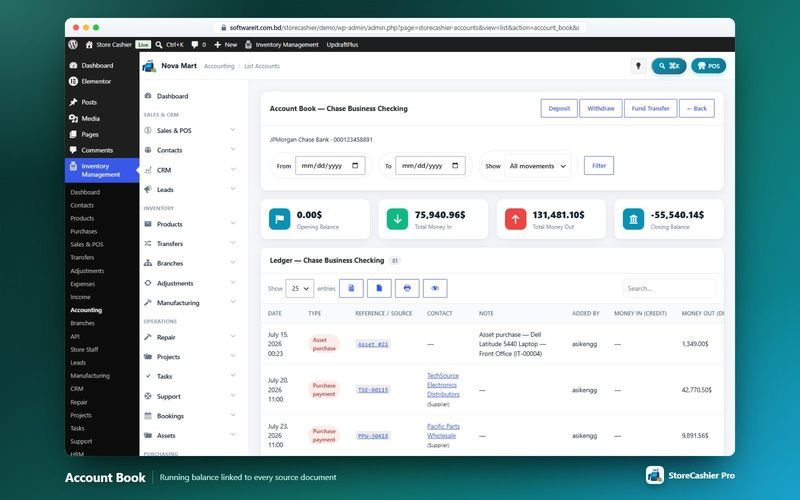
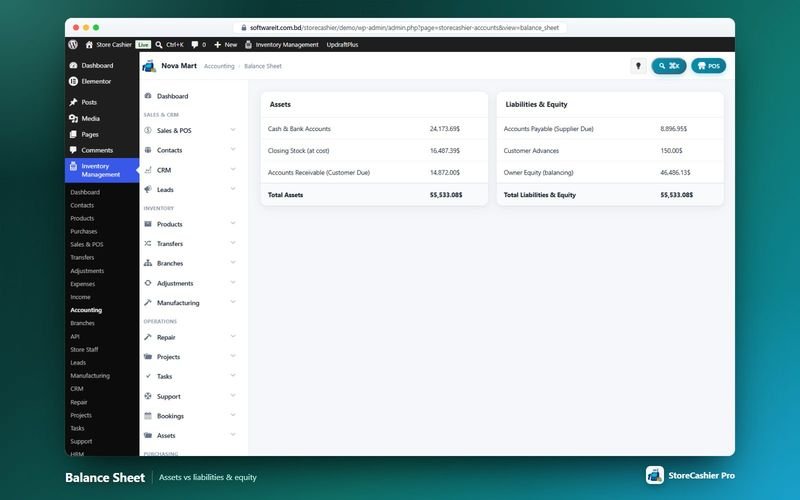
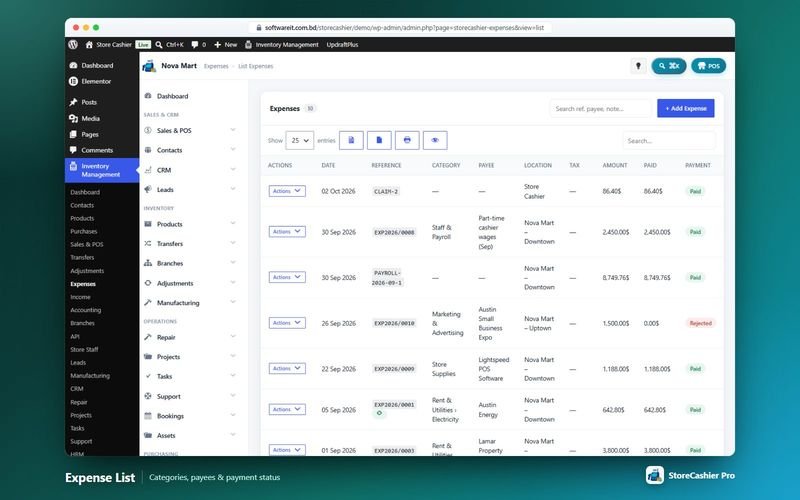
Get StoreCashier Pro for $59 $99See it yourself in the live demo (admin / admin), then buy once.
Accounting FAQ
Answers based on the StoreCashier documentation.
Does StoreCashier include accounting?
The free edition includes payment accounts, an account book per account, deposits, withdrawals, fund transfers, a balance sheet and a payment account report. StoreCashier Pro adds expenses, income, trial balance and cash flow, and posts payroll, repairs and asset transactions to your accounts.
Do I need to set up payment accounts?
It is recommended. Add your cash drawer, bank, card and mobile wallet accounts with opening balances, then choose default accounts for money received or paid without a chosen account.
Can I record recurring expenses?
Yes, with StoreCashier Pro. Expenses and income can repeat every N days, weeks, months or years, and a daily task creates the entries.
Which transactions post to payment accounts automatically?
POS sales, online order payments, refunds, purchase and contact payments, fund transfers, deposits and withdrawals in every edition. In StoreCashier Pro also expenses, income, payroll, loans, expense claims, repair payments, asset transactions, transfer shipping, project expenses and register cash moves.
More answers in the full FAQ and the documentation.
Get StoreCashier Pro for $59 $99All 20 optional modules plus the advanced POS, multi-location stock and 60 reports.
Related modules
Everything in StoreCashier shares one database, so these modules work together out of the box.
Reports Free + Pro
A dashboard that respects permissions, 60 built-in reports in StoreCashier Pro and a Report Builder that pins your own charts to the dashboard.
Explore Reports →Sales & Orders Free + Pro
Website orders and POS sales in one list — with invoices, packing slips, payments, profit, returns and notifications.
Explore Sales & Orders →Purchasing Free + Pro
Buy stock from suppliers with lots, landed costs, part payments and due dates — stock is added only when goods are received.
Explore Purchasing →HRM & Payroll Pro
From hiring to payslip: employees, attendance, leave, payroll, performance, recruitment, training and an employee portal in WooCommerce My Account.
Explore HRM & Payroll →Subscriptions Pro
Sell subscription products with trials, sign-up fees, synchronised renewals, plan switching and customer self-service — plus internal recurring invoices.
Explore Subscriptions →
Get StoreCashier Pro for $59
Accounting is included in StoreCashier Pro together with every other module — one plugin, one-time payment.
Start free, upgrade anytime. 7 of the Accounting features on this page are already in the free StoreCashier plugin on WordPress.org. Install it at no cost, then upgrade to Pro — your data is kept.
Download StoreCashier FreeDemo login: admin / admin · Support · Free version on WordPress.org · Pricing details