
WooCommerce Inventory Management with Stock Ledger & Barcodes
Know your stock down to the product, variation, location and lot — with every movement recorded in an append-only ledger and synced to WooCommerce.
Demo login: admin / admin · Support · Free vs Pro · Free version
What Inventory does
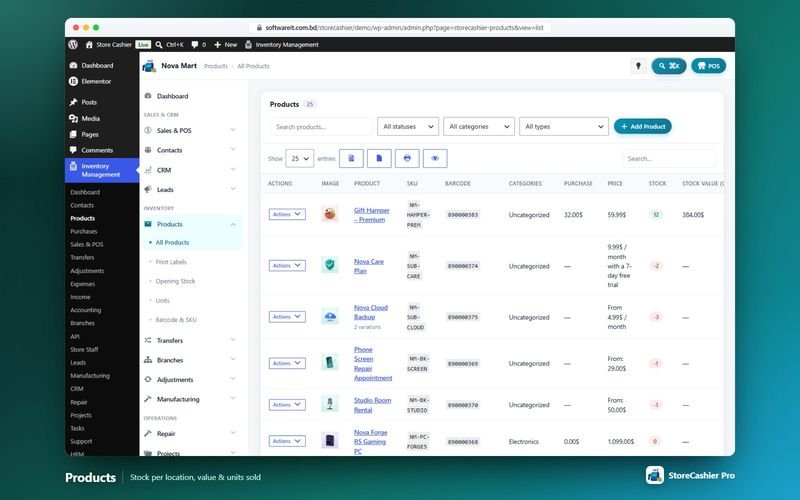
StoreCashier adds real inventory management to WooCommerce. Instead of a single stock number, every purchase, sale and opening-stock entry is written to an append-only stock ledger, and the resulting quantity is synced back to WooCommerce. You can open the history of any product or variation and see exactly what came in, what went out, the current stock and its value at cost.
The free plugin covers the stock ledger, product stock history, units, barcode and SKU tools, opening stock (on screen or by CSV), barcode label printing and one business location. StoreCashier Pro adds stock per business location, stock transfers, stock adjustments, an in-plugin product editor for every WooCommerce product type, StoreCashier columns in the WooCommerce CSV importer and advanced stock reports.
Availability: Available in the free plugin and in StoreCashier Pro — items marked Pro need StoreCashier Pro.
Inventory features
Free = included in the free StoreCashier plugin on WordPress.org (and in Pro). Pro = StoreCashier Pro only.
Stock ledger and stock history
- Append-only stock ledger FreeEvery purchase, sale and opening-stock entry is a stock movement. In Pro the ledger also records returns, transfers, adjustments and production.
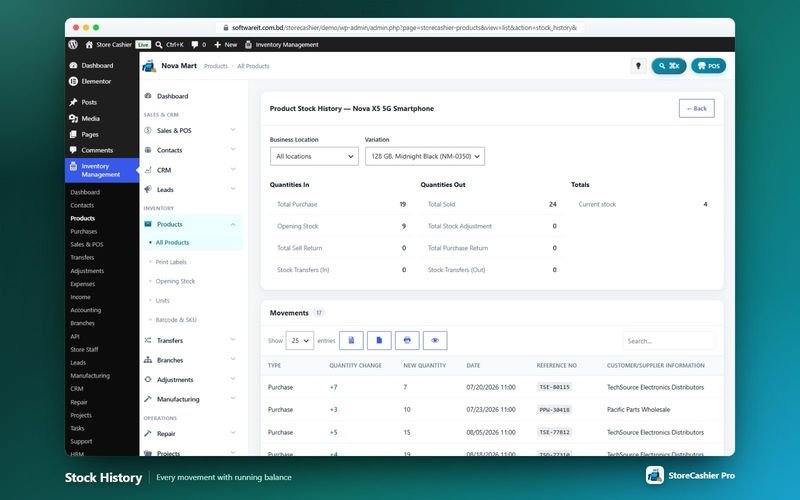
- Product stock history FreePer product and variation: quantities in (purchases, opening stock, sell returns, transfers in), quantities out (sales, adjustments, purchase returns, transfers out), current stock and stock value at cost.
- WooCommerce stock sync FreeThe ledger total is kept equal to the WooCommerce stock quantity, so the storefront always shows the right availability.
- Stock per business location ProSeparate stock for each shop, warehouse or branch, with opening stock per location.
Products, units and barcodes
- Products list FreeYour WooCommerce catalogue with stock, purchase price, status and WooCommerce sync. Row actions include labels, opening stock and stock history.
- StoreCashier fields on the WooCommerce product editor FreeUnit, barcode, purchase price and IMEI / serial tracking right on the native product screen.
- Units of measure FreeUnits with a short name, optional decimal quantities and multiples of a base unit (for example 1 Box = 12 Pieces).
- Barcode and SKU tools FreeA grid of products and variations with inline-editable barcode and SKU, plus bulk generation of missing values with your own prefixes.
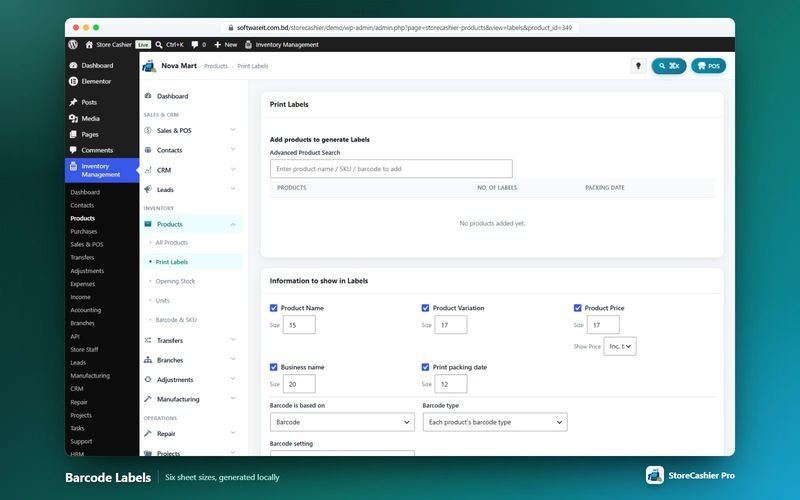
- Barcode label printing FreeCode 128, Code 39, EAN-13, EAN-8 and UPC-A labels on several sheet sizes and continuous rolls, with name, price, SKU, variation, business name and packing date. Barcodes are generated locally.
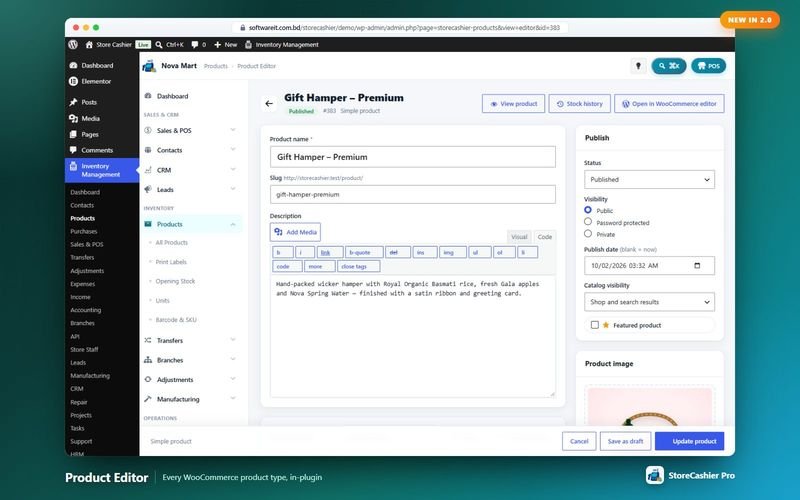
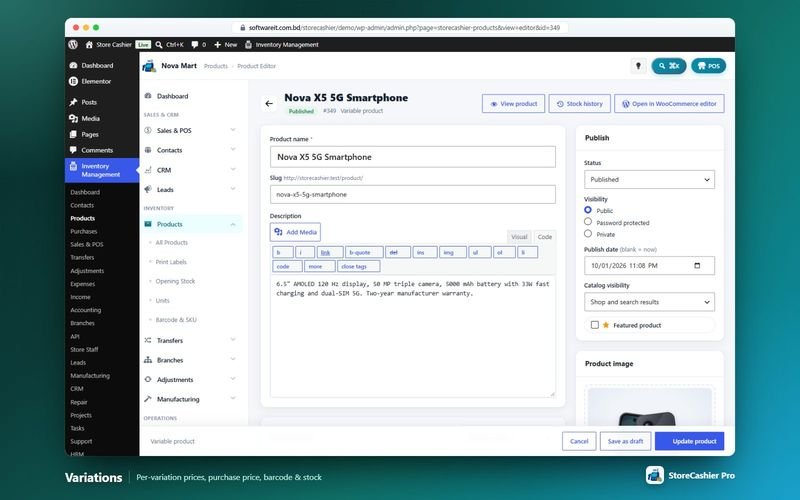
- In-plugin product editor ProCreate and edit every WooCommerce product type, attributes and variations without leaving StoreCashier, with variation bulk actions for prices, purchase prices, stock and more.
- WooCommerce CSV importer / exporter columns ProA StoreCashier column group (purchase price, unit, barcode, barcode type, opening stock location) in the native WooCommerce product CSV tools.
Opening stock and existing stores
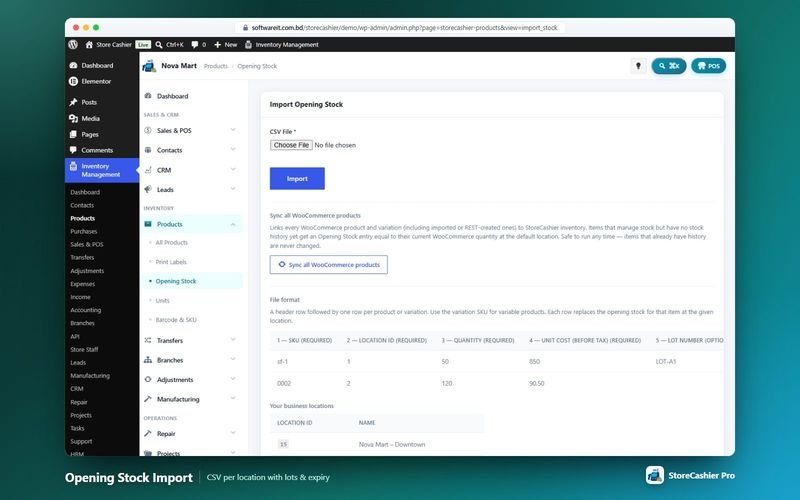
- Opening stock on screen or by CSV FreeEnter quantities and unit cost per product, or import a CSV with SKU, location, quantity, unit cost, lot number and expiry date. Row errors are listed after the import.
- Sync all WooCommerce products FreeLinks every product and variation to the stock ledger and creates opening stock from the current WooCommerce quantity.
- Bulk stock tools FreeEnable or disable “manage stock” on all products and sync all quantities to WooCommerce in one click.
- Lots and expiry dates FreeLot numbers on purchase lines and lot plus expiry on opening stock. Pro adds lot and expiry reports.
Transfers, adjustments and stock reports
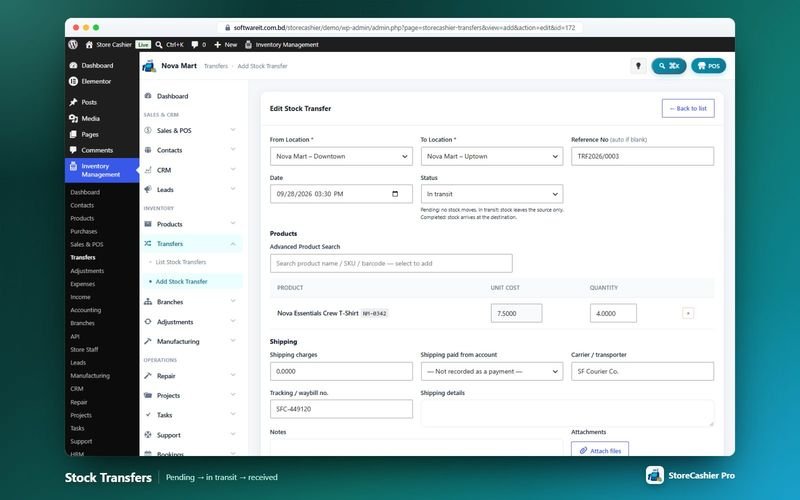
- Stock transfers ProMove stock between locations with Pending (no stock moves), In transit (stock leaves the source) and Completed (stock arrives) statuses, shipping charges, carrier and tracking number.
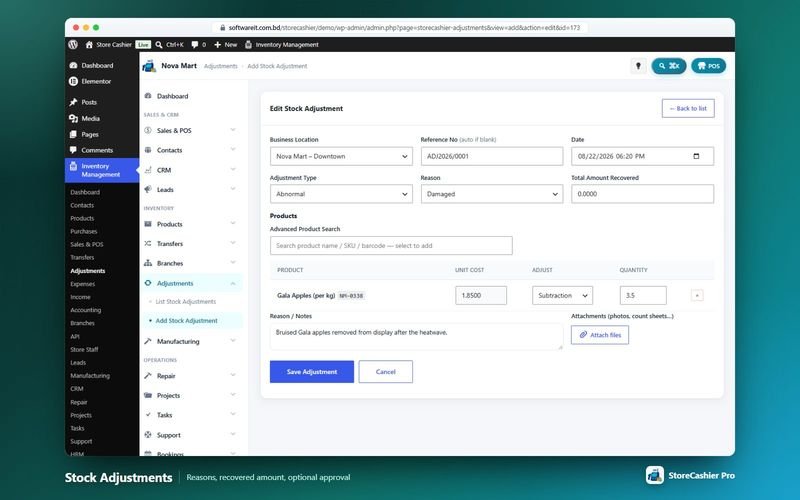
- Stock adjustments ProCorrect stock for damage, expiry, loss, theft, stock counts, internal use, samples or found stock, with addition / subtraction lines, amount recovered, notes and attachments.
- Optional approval for adjustments ProWith the Approvals module gate switched on, stock moves only after the adjustment is approved.
- Serial numbers everywhere ProSerials are tracked on returns, transfers, adjustments, manufacturing and repair parts.
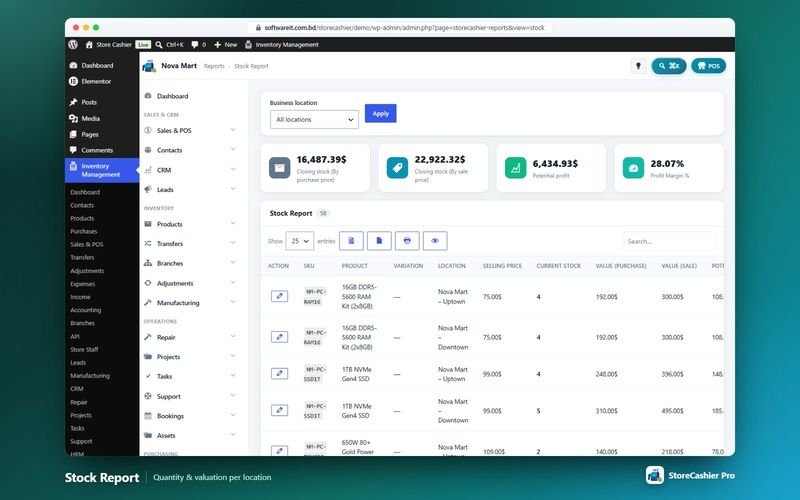
- Stock report FreeStock per product with valuation.
- Advanced stock reports ProStock valuation at cost and retail, low stock / reorder with suggested quantity, expiry, lot, stock adjustment and stock transfer reports.
Get StoreCashier Pro for $59 $99Unlock every Inventory feature plus all other Pro modules.
How Inventory works
The typical workflow, step by step.
- Sync your catalogueRun Sync all WooCommerce products: every product and variation is linked and current quantities become opening stock.
- Set opening stockAdjust quantities per location on screen or import a CSV with SKU, location, quantity, cost, lot and expiry.
- Buy and sellReceived purchases add stock; POS sales and online orders deduct it at the statuses you choose.
- Move and correct stockUse transfers between locations and adjustments with reasons (Pro) — every movement lands in the ledger.
- Watch the reportsUse the stock report, stock history and (Pro) low stock / reorder, expiry and valuation reports.
Inventory screenshots
Real screens from the StoreCashier Pro demo store. Click to enlarge.
Get StoreCashier Pro for $59 $99See it yourself in the live demo (admin / admin), then buy once.
Inventory FAQ
Answers based on the StoreCashier documentation.
How does the stock ledger work?
Every purchase, sale and opening-stock entry is recorded as a stock movement. The product stock history shows quantities in and out, current stock and stock value at cost, and the total is synced back to WooCommerce.
Can I import opening stock?
Yes. Enter opening stock on screen or import a CSV with SKU, location, quantity, unit cost and optional lot number and expiry date. “Sync all WooCommerce products” can also create opening stock from your current WooCommerce quantities.
Can I generate SKUs and barcodes automatically?
Yes. The Barcode & SKU screen generates missing SKUs and barcodes in bulk with your own prefixes, and you can edit them on the same grid.
Which barcode types can I print?
Code 128, Code 39, EAN-13, EAN-8 and UPC-A, on several sheet sizes or continuous rolls. Barcodes are generated locally, with no external service.
Can I track lot numbers and expiry dates?
Yes. Purchases accept a lot number per line, and opening stock accepts a lot number and an expiry date. StoreCashier Pro adds lot and expiry reports, stock valuation and a low stock / reorder report.
Can I manage stock in several warehouses?
Yes, with StoreCashier Pro: stock per business location, opening stock per location, stock transfers with in-transit tracking and stock adjustments. The free edition manages one business location.
More answers in the full FAQ and the documentation.
Get StoreCashier Pro for $59 $99All 20 optional modules plus the advanced POS, multi-location stock and 60 reports.
Related modules
Everything in StoreCashier shares one database, so these modules work together out of the box.
Purchasing Free + Pro
Buy stock from suppliers with lots, landed costs, part payments and due dates — stock is added only when goods are received.
Explore Purchasing →Multi-location & Staff Free + Pro
Shops, warehouses and branches with their own stock, registers, staff and accounts — compared side by side.
Explore Multi-location & Staff →IMEI & Serial Tracking Free + Pro
Follow every phone, laptop or device by its IMEI or serial number — from purchase to sale, return and repair.
Explore IMEI & Serial Tracking →Manufacturing Pro
Multi-level bills of materials, production orders with job cards and quality checks, material planning and actual-cost posting into the stock ledger.
Explore Manufacturing →Reports Free + Pro
A dashboard that respects permissions, 60 built-in reports in StoreCashier Pro and a Report Builder that pins your own charts to the dashboard.
Explore Reports →
Get StoreCashier Pro for $59
Inventory is included in StoreCashier Pro together with every other module — one plugin, one-time payment.
Start free, upgrade anytime. 13 of the Inventory features on this page are already in the free StoreCashier plugin on WordPress.org. Install it at no cost, then upgrade to Pro — your data is kept.
Download StoreCashier FreeDemo login: admin / admin · Support · Free version on WordPress.org · Pricing details