
Fixed Asset Management & Depreciation for WordPress
An asset register with custody, transfers, maintenance schedules, three depreciation methods, disposal with gain or loss and QR / barcode labels.
Demo login: admin / admin · Support · Free vs Pro · Free version
What Fixed Assets does
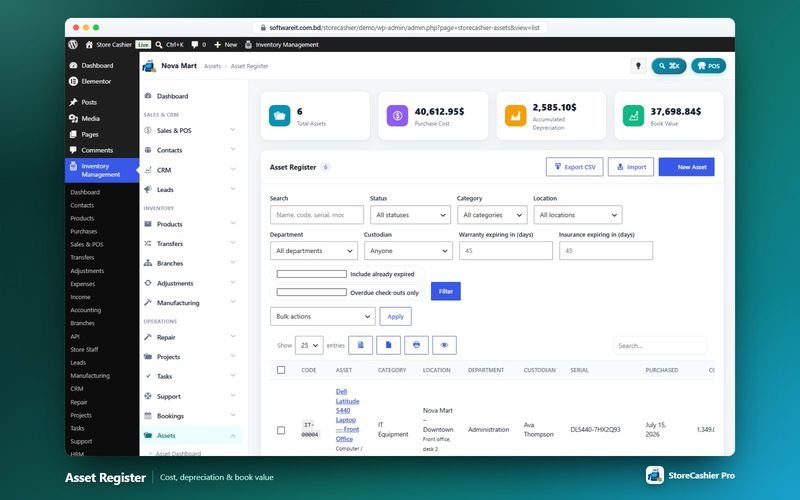
The StoreCashier Pro Assets module keeps a fixed-asset register next to your inventory and accounts. Each asset records identification, location and custodian, purchase details and the account it was paid from, warranty and insurance, and depreciation settings. Quick templates cover computers, mobiles, furniture, vehicles, machinery, buildings, land and software licences.
Assets can be checked out and in, transferred and maintained on a schedule. Depreciation is calculated by straight-line, declining-balance or units-of-production, and disposals record proceeds into an account with the gain or loss calculated.
Availability: This module is part of StoreCashier Pro. In the free plugin it is visible as a read-only preview marked PRO.
Fixed Assets features
Register and dashboard
- Asset dashboard ProActive assets, cost, accumulated depreciation, book value, in use / in store / under maintenance, overdue check-outs, maintenance due and expiring warranties and insurance.
- Asset register ProFilters by status, category, location, department, custodian and expiries, with bulk print labels, export, set status and delete.
- Quick templates ProComputer, mobile, furniture, vehicle, machinery, heavy equipment, building, land and software licence.
Custody, maintenance and depreciation
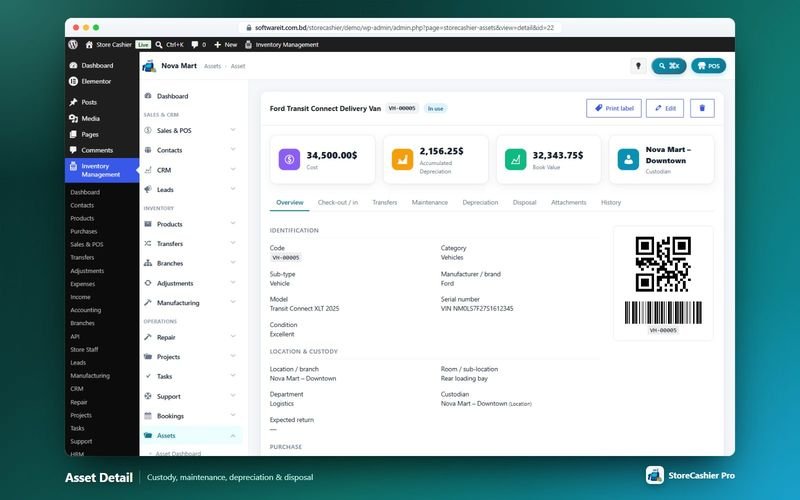
- Check-out / check-in ProCustodian can be an employee, staff user, location or customer, with expected return and overdue flags.
- Transfers ProMove assets between locations with a full history.
- Maintenance schedules and logs ProRepeat every N days, weeks or months; logs with vendor, cost, paid-from account and downtime.
- Depreciation methods ProStraight-line, declining balance, units of production (with usage readings) or none, scheduled by financial year.
- Disposal with gain or loss ProDate, method, proceeds into an account and buyer; disposals can be reinstated.
Labels, import and reports
- QR code and barcode labels ProGenerated locally in sizes from 38×25 to 100×50 mm on A4 / Letter sheets or label printers.
- CSV import and export ProMap columns, update existing codes and create missing categories (up to 5,000 rows); exports include book value and disposal gain / loss.
- Five asset reports ProAsset register as of any date, depreciation, maintenance cost, assets by location / custodian and expiring warranties & insurance.
Get StoreCashier Pro for $59 $99Unlock every Fixed Assets feature plus all other Pro modules.
How Fixed Assets works
The typical workflow, step by step.
- Register the assetPick a template and enter purchase, warranty and depreciation details.
- Label itPrint a QR code or barcode label.
- Assign custodyCheck the asset out to an employee, location or customer.
- Maintain itSchedule maintenance; costs post to your accounts.
- Depreciate and disposeReview the schedule and record the disposal with gain or loss.
Fixed Assets screenshots
Real screens from the StoreCashier Pro demo store. Click to enlarge.
Get StoreCashier Pro for $59 $99See it yourself in the live demo (admin / admin), then buy once.
Fixed Assets FAQ
Answers based on the StoreCashier documentation.
Can I manage fixed assets and depreciation?
Yes, with StoreCashier Pro. The asset register tracks custody check-out and check-in, transfers, maintenance schedules and logs, and calculates straight-line, declining-balance or units-of-production depreciation.
Can I print asset labels?
Yes. QR codes and Code 128 barcodes are generated locally, in sizes from 38×25 to 100×50 mm.
Can I import my existing asset list?
Yes. The CSV import maps columns, can update existing asset codes and creates missing categories.
How are disposals recorded?
Enter the date, method, proceeds (into a payment account) and buyer; the gain or loss is calculated, and the disposal can be reinstated.
More answers in the full FAQ and the documentation.
Get StoreCashier Pro for $59 $99All 20 optional modules plus the advanced POS, multi-location stock and 60 reports.
Related modules
Everything in StoreCashier shares one database, so these modules work together out of the box.
Accounting Free + Pro
Money follows every transaction: sales, purchases, expenses, payroll and refunds post to the right payment account automatically.
Explore Accounting →HRM & Payroll Pro
From hiring to payslip: employees, attendance, leave, payroll, performance, recruitment, training and an employee portal in WooCommerce My Account.
Explore HRM & Payroll →Approvals, Documents & Audit Pro
Your team, your rules, your paper trail: approvals with conditions and escalation, versioned documents and a field-level audit trail.
Explore Approvals, Documents & Audit →Reports Free + Pro
A dashboard that respects permissions, 60 built-in reports in StoreCashier Pro and a Report Builder that pins your own charts to the dashboard.
Explore Reports →Multi-location & Staff Free + Pro
Shops, warehouses and branches with their own stock, registers, staff and accounts — compared side by side.
Explore Multi-location & Staff →
Get StoreCashier Pro for $59
Fixed Assets is included in StoreCashier Pro together with every other module — one plugin, one-time payment.
Start free, upgrade anytime. The free StoreCashier plugin on WordPress.org includes the POS, stock ledger, purchases and accounts, and shows Fixed Assets as a read-only preview marked PRO. Upgrade when you are ready — your data is kept.
Download StoreCashier FreeDemo login: admin / admin · Support · Free version on WordPress.org · Pricing details