
WordPress Project Management with Tasks, Gantt & Timesheets
Plan, staff, track and invoice client or internal projects — with a full task manager, timers, timesheets and a customer portal.
Demo login: admin / admin · Support · Free vs Pro · Free version
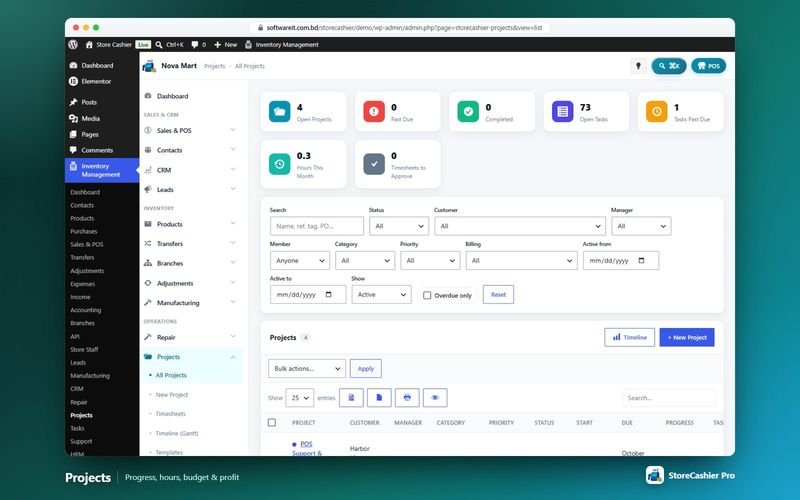
What Projects & Tasks does
The StoreCashier Pro Projects module plans and runs client or internal projects with tasks, a Kanban board, a Gantt timeline, milestones, team rates, budgets, expenses, files, discussions and invoices. Projects can be fixed price, hourly or non-billable, and progress can be calculated from tasks, hours or milestones.
Time is captured with running timers and timesheets that go through approval, and unbilled work becomes an invoice as a StoreCashier sale or a WooCommerce order. The Tasks module — required by Projects — also works on its own as a full task manager with calendar, checklists, subtasks, dependencies, recurring tasks and @mentions.
Availability: This module is part of StoreCashier Pro. In the free plugin it is visible as a read-only preview marked PRO.
Projects & Tasks features
Projects
- Project list ProOpen, past due, completed, open tasks, hours this month and timesheets to approve, with progress, hours, budget, cost, revenue, profit, invoiced and unbilled columns.
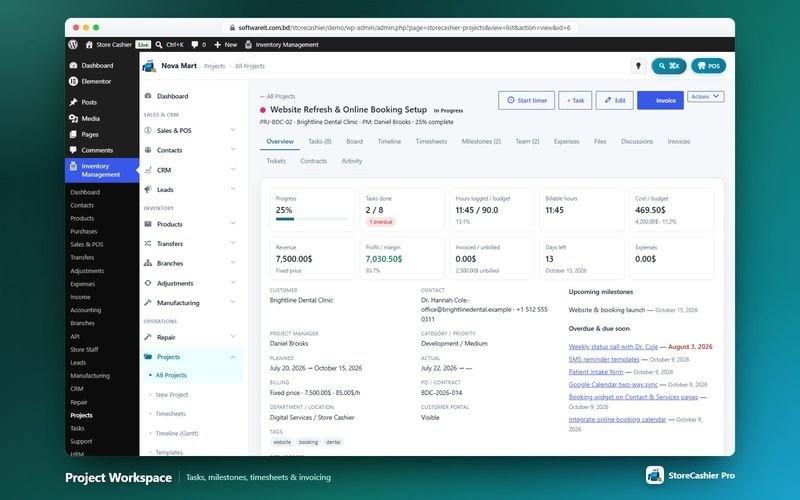
- Billing and budgets ProFixed price, hourly (per task, per staff member or single rate) or non-billable, with cost budget, budget hours and a budget alert.
- Project workspace ProOverview, tasks, board, timeline, timesheets, milestones, team, expenses, files, discussions, invoices, tickets, contracts and activity.
- Milestones and expenses ProMilestones with billing amounts and customer visibility; expenses with markup, receipt, paid-from account and re-billing.
- Invoice unbilled work ProInvoice fixed price, approved billable time, milestones and billable expenses as a StoreCashier sale or a WooCommerce order.
- Templates ProSave projects as templates and install ready-made starter templates.
- Customer portal ProProjects in My Account with status, progress, milestones, tasks, time log, files and messages — each section switchable.
Time tracking
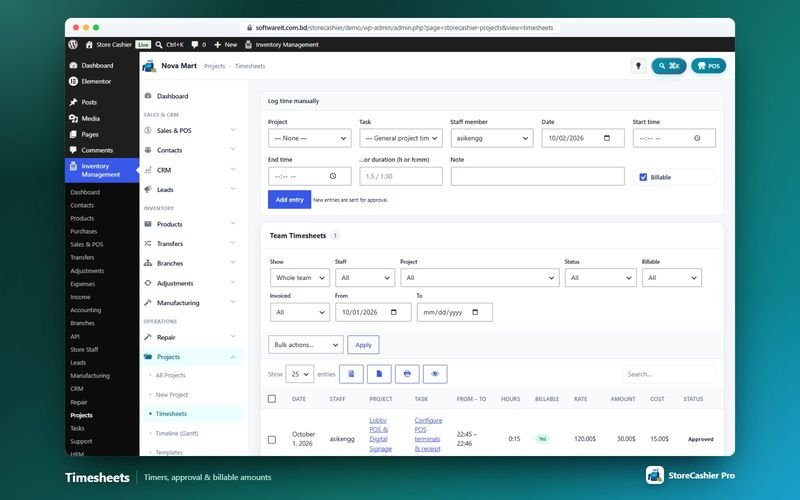
- Timers and manual entries ProStart / stop timers from the header or log time with project, task, staff, date and billable flag.
- Timesheet approval ProDraft → Awaiting approval → Approved / Rejected, with bulk approve and reject with reason.
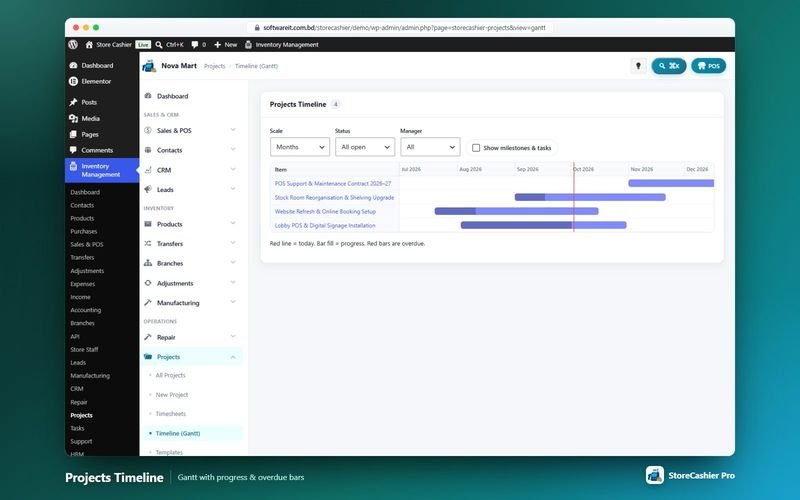
- Gantt timeline ProAll projects by days, weeks or months with optional milestones and tasks.
Tasks
- My Tasks and All Tasks ProOverdue, today, next 7 days, following and created by me, with rich filters and bulk actions.
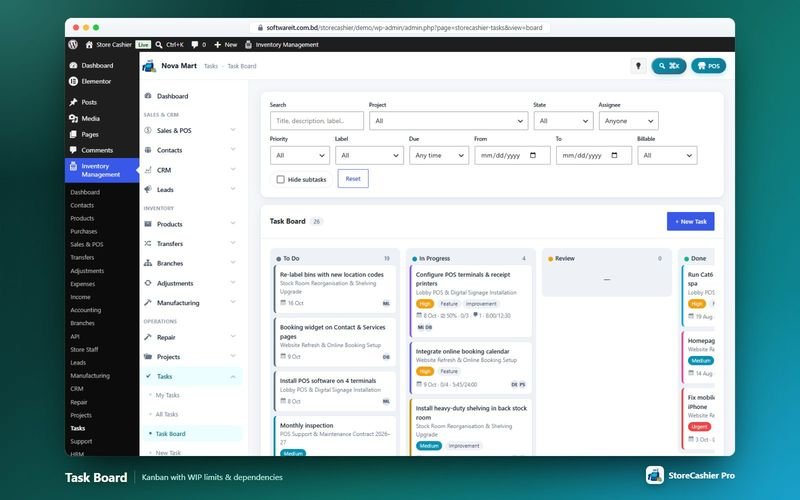
- Kanban with WIP limits ProTasks blocked by dependencies can't be moved.
- Calendar ProMonth view of tasks and project milestones.
- Rich task form ProChecklists, subtasks, estimates, reminders, billable rate, labels, followers, dependencies and links to contacts, deals, tickets, repair jobs and other records.
- Recurring tasks and @mentions ProDaily, weekly, monthly, yearly or custom repeats; comments with @mentions and e-mail notifications.
Get StoreCashier Pro for $59 $99Unlock every Projects & Tasks feature plus all other Pro modules.
How Projects & Tasks works
The typical workflow, step by step.
- Create the projectStart from scratch or a template; set customer, team, rates and budget.
- Plan the workAdd milestones and tasks, then view them on the board and Gantt timeline.
- Track timeTeam members run timers or log time; managers approve timesheets.
- Keep the client informedShare progress, milestones and files in the My Account project portal.
- InvoiceTurn unbilled work into a sale or a WooCommerce order.
Projects & Tasks screenshots
Real screens from the StoreCashier Pro demo store. Click to enlarge.
Get StoreCashier Pro for $59 $99See it yourself in the live demo (admin / admin), then buy once.
Projects & Tasks FAQ
Answers based on the StoreCashier documentation.
Do I need the Tasks module for Projects?
Yes. Projects requires the Tasks module; the module manager switches it on automatically when you enable Projects.
Can I invoice project time through WooCommerce?
Yes. Unbilled work (fixed price, approved billable time, milestones and billable expenses) can be invoiced as a StoreCashier sale or a WooCommerce order.
Can clients see their projects?
Yes. Customers see their projects under My Account → Projects, with the sections you choose, and can post messages to the team.
Is there a Gantt chart?
Yes. The timeline shows all projects by days, weeks or months with optional milestones and tasks.
More answers in the full FAQ and the documentation.
Get StoreCashier Pro for $59 $99All 20 optional modules plus the advanced POS, multi-location stock and 60 reports.
Related modules
Everything in StoreCashier shares one database, so these modules work together out of the box.
CRM & Leads Pro
From the first web-form submission to a signed contract and a WooCommerce order — pipelines, proposals, contracts and lead scoring in one place.
Explore CRM & Leads →Support Tickets Pro
A helpdesk with departments, priorities, SLA tracking, canned replies, a knowledge base and a customer portal in WooCommerce My Account.
Explore Support Tickets →HRM & Payroll Pro
From hiring to payslip: employees, attendance, leave, payroll, performance, recruitment, training and an employee portal in WooCommerce My Account.
Explore HRM & Payroll →Accounting Free + Pro
Money follows every transaction: sales, purchases, expenses, payroll and refunds post to the right payment account automatically.
Explore Accounting →Repair Shop Pro
Job sheets for phone, computer and device repair shops — intake checklist, estimates with customer approval, parts from stock, invoicing and warranty.
Explore Repair Shop →
Get StoreCashier Pro for $59
Projects & Tasks is included in StoreCashier Pro together with every other module — one plugin, one-time payment.
Start free, upgrade anytime. The free StoreCashier plugin on WordPress.org includes the POS, stock ledger, purchases and accounts, and shows Projects & Tasks as a read-only preview marked PRO. Upgrade when you are ready — your data is kept.
Download StoreCashier FreeDemo login: admin / admin · Support · Free version on WordPress.org · Pricing details