
WooCommerce Purchase Order & Supplier Management
Buy stock from suppliers with lots, landed costs, part payments and due dates — stock is added only when goods are received.
Demo login: admin / admin · Support · Free vs Pro · Free version
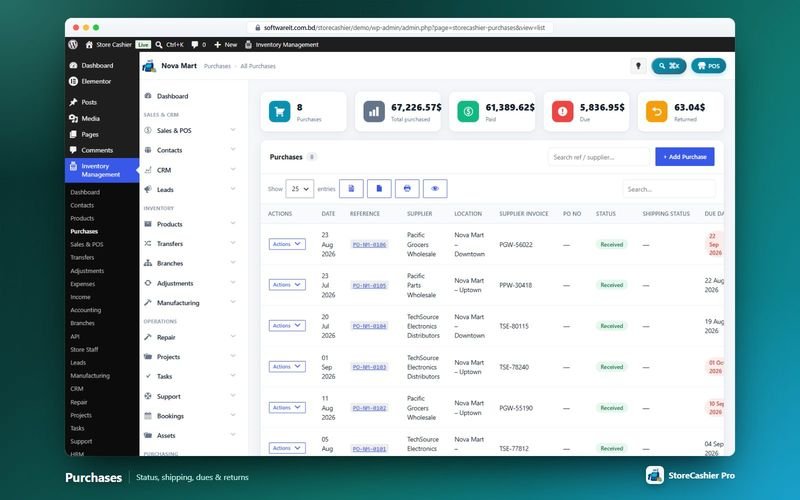
What Purchasing does
StoreCashier records what you buy from suppliers and what it really cost you. A purchase holds the supplier, references, line items with unit cost, quantity, lot number, tax and discount, plus shipping charges and additional expenses such as customs or handling, so the total reflects the landed cost. Received purchases add stock to the ledger automatically; editing or deleting a purchase adjusts stock cleanly.
Payments can be made on the purchase or later, in full or in part, from any payment account, with pay terms and due dates. The free plugin includes purchases, supplier payments, IMEI / serial capture, attachments and printable purchase orders. StoreCashier Pro adds shipping status and tracking and purchase returns (debit notes) with supplier refunds.
Availability: Available in the free plugin and in StoreCashier Pro — items marked Pro need StoreCashier Pro.
Purchasing features
Free = included in the free StoreCashier plugin on WordPress.org (and in Pro). Pro = StoreCashier Pro only.
Purchases
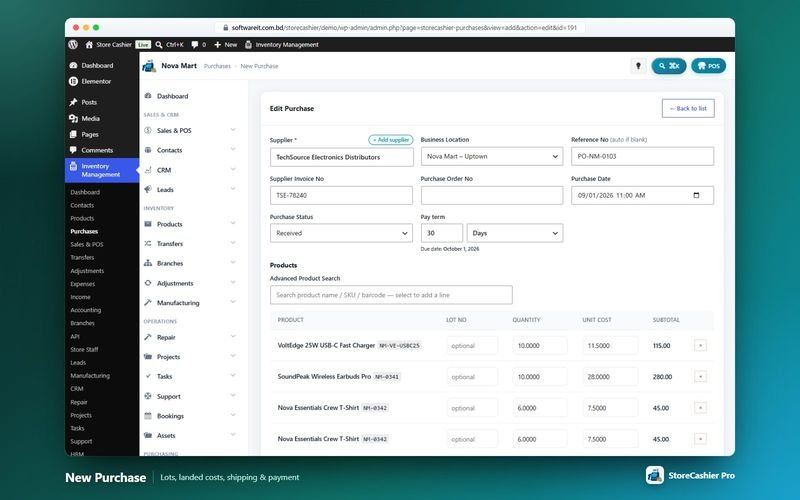
- Purchase header FreeSupplier, business location, reference (automatic if blank), supplier invoice number, date and status — Received, Pending or Ordered — plus pay term.
- Line items FreeSearch products by name, SKU or barcode; each line has unit cost (pre-filled from the purchase price), quantity, lot number, purchase tax and discount.
- Landed cost FreeShipping charges and additional expenses are added to the grand total so stock value and profit reports use what goods really cost.
- Stock rule FreeOnly a Received purchase adds stock. Changing the status to or from Received moves stock, editing reverses and re-applies it, deleting reverses it.
- IMEI and serial numbers FreeCapture IMEI or serial numbers on purchase lines for serial-tracked products.
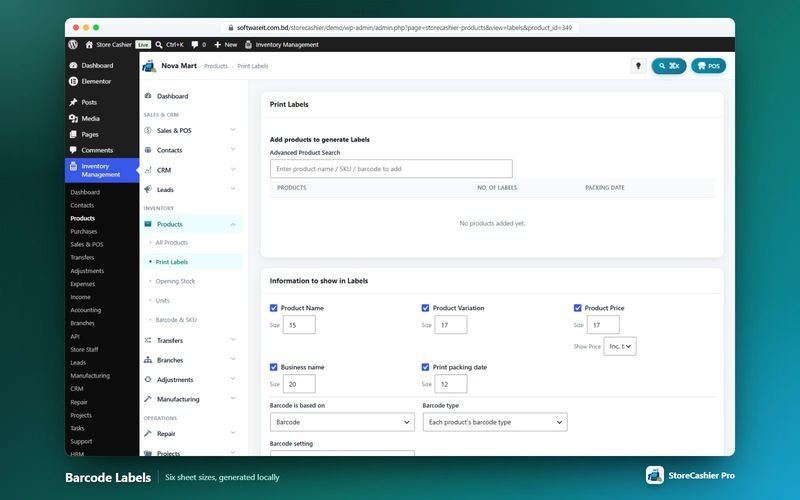
- Attachments and printing FreeAttach documents, print the purchase order and print barcode labels for received items.
Supplier payments and dues
- Pay now or later FreePay in full, in part or later from a chosen payment account, with method and reference.
- Pay terms and due dates FreeEach purchase carries a pay term and due date; the purchases list shows payment status, dues and payment history.
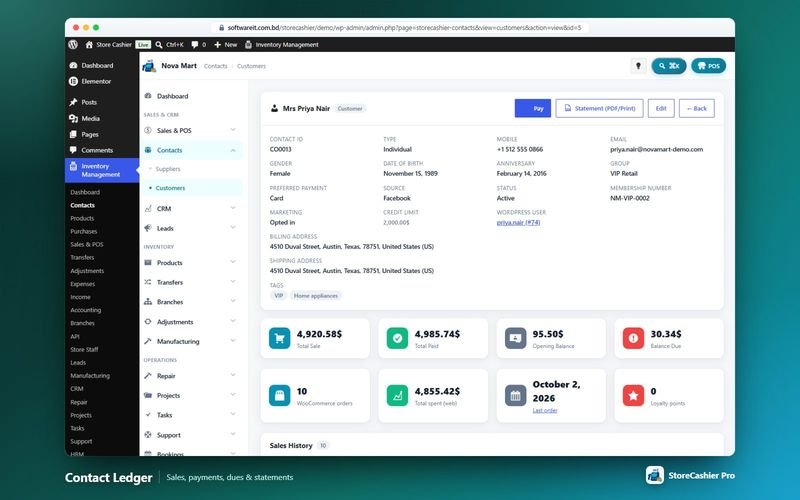
- Supplier ledger FreeSupplier profiles show total purchases, payments and balance due; payments are applied to the oldest dues first and printable statements are available.
Shipping and returns
- Shipping status and tracking ProOrdered, Packed, Shipped, Delivered or Cancelled, with carrier, tracking number, details and delivery address.
- Purchase returns (debit notes) ProReturn quantities with discount, date, reason (damaged, wrong item, quality issue, excess quantity, expired, late delivery, other), notes and attachments.
- Supplier refunds ProRecord supplier refunds into a payment account from the debit note.
- Purchase reports FreeProduct purchase report in the free plugin; purchase payment, purchase return and purchase & sale reports in Pro.
Get StoreCashier Pro for $59 $99Unlock every Purchasing feature plus all other Pro modules.
How Purchasing works
The typical workflow, step by step.
- Create the purchasePick the supplier (or add one in a popup), location, references and status.
- Add items and costsAdd products with unit cost, quantity and lot, then discount, tax, shipping and additional expenses.
- Receive the goodsSet the status to Received — stock is added to the ledger at that location.
- Pay the supplierPay in full, in part or later from any account; dues stay visible until settled.
- Return if neededCreate a purchase return (debit note) and record the supplier refund (Pro).
Purchasing screenshots
Real screens from the StoreCashier Pro demo store. Click to enlarge.
Get StoreCashier Pro for $59 $99See it yourself in the live demo (admin / admin), then buy once.
Purchasing FAQ
Answers based on the StoreCashier documentation.
How do purchases and supplier payments work?
Create a purchase with the supplier, items, unit costs, taxes, discount, shipping and additional expenses. A received purchase adds stock automatically. Pay in full, in part or later from a payment account; the purchases list shows what is paid and what is due.
What is landed cost on purchases?
Shipping charges and additional expenses (for example customs or handling) can be added to a purchase so the total reflects what the goods really cost you. Purchase prices are then used for stock value and profit reports.
Does a pending or ordered purchase change stock?
No. Only a purchase with the status Received adds stock. Changing the status to or from Received moves stock accordingly.
Can I return goods to a supplier?
Yes, with StoreCashier Pro. Purchase returns create a debit note with the return reason, and supplier refunds can be recorded into a payment account.
Can I print barcode labels for a purchase?
Yes. Start label printing from a purchase and every purchased line is pre-filled.
More answers in the full FAQ and the documentation.
Get StoreCashier Pro for $59 $99All 20 optional modules plus the advanced POS, multi-location stock and 60 reports.
Related modules
Everything in StoreCashier shares one database, so these modules work together out of the box.
Inventory Free + Pro
Know your stock down to the product, variation, location and lot — with every movement recorded in an append-only ledger and synced to WooCommerce.
Explore Inventory →Contacts Free + Pro
Everyone you sell to and buy from — with balances, statements and two-way sync with WooCommerce customers and WordPress users.
Explore Contacts →Accounting Free + Pro
Money follows every transaction: sales, purchases, expenses, payroll and refunds post to the right payment account automatically.
Explore Accounting →IMEI & Serial Tracking Free + Pro
Follow every phone, laptop or device by its IMEI or serial number — from purchase to sale, return and repair.
Explore IMEI & Serial Tracking →Reports Free + Pro
A dashboard that respects permissions, 60 built-in reports in StoreCashier Pro and a Report Builder that pins your own charts to the dashboard.
Explore Reports →
Get StoreCashier Pro for $59
Purchasing is included in StoreCashier Pro together with every other module — one plugin, one-time payment.
Start free, upgrade anytime. 10 of the Purchasing features on this page are already in the free StoreCashier plugin on WordPress.org. Install it at no cost, then upgrade to Pro — your data is kept.
Download StoreCashier FreeDemo login: admin / admin · Support · Free version on WordPress.org · Pricing details