
Offline POS App for Windows & Android
Keep selling when the internet is down. The StoreCashier POS app pairs with your WooCommerce site, sells offline and syncs every sale automatically.
Free on WordPress.orgPro from $5 / monthMonthly, yearly or lifetime
Demo login: admin / admin · Support · Free vs Pro · Free version
What POS Apps does
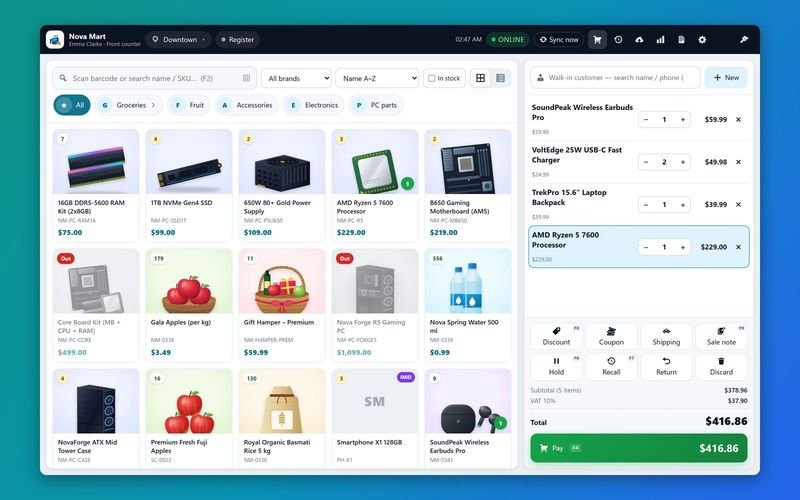
The StoreCashier POS app is a native app for Windows PCs and for Android phones and tablets. It pairs with StoreCashier Pro on your WooCommerce site using a one-time 8-character code or a QR code, downloads the products, prices, stock per location, taxes, customers and settings, and keeps them in sync. Each paired device sells with the cashier's own permissions — locations, payment accounts, discount limits and price editing.
Sales made without internet are saved on the device together with the stock change and printed as a receipt marked offline. As soon as the connection is back they are uploaded in order, one at a time, and become real WooCommerce orders with the StoreCashier sale, payment and stock movement — exactly like a sale from the web register. Anything that needs a manager's attention (for example a sale without enough stock) is flagged on the Sync issues list instead of being lost.
The apps are included with the Pro + POS Apps package (2 devices) and the Business package (5 devices); more devices can be added at any time.
Availability: Included in the Pro + POS Apps package (2 devices) and the Business package (5 devices); extra devices are available as an add-on. The apps need StoreCashier Pro on your WooCommerce site.
POS Apps features
Offline selling and sync
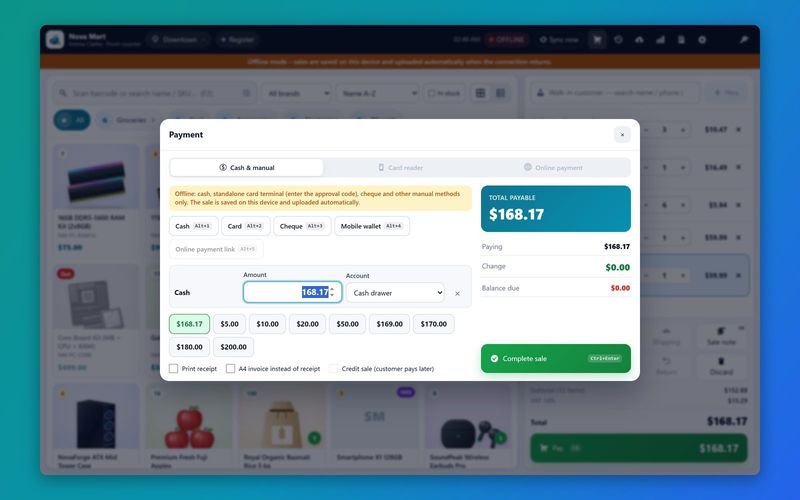
- Sell without internet ProCash, standalone card terminal with approval code, cheque and other manual methods work offline; holds, discounts within limits and serial numbers from the cached list too.
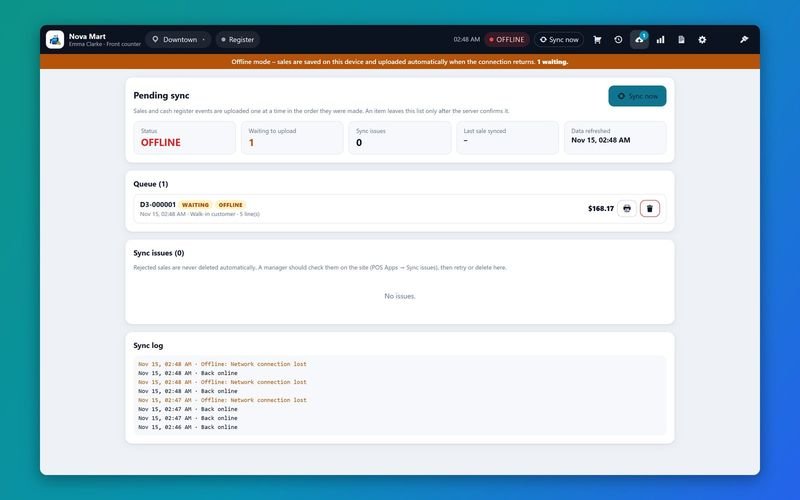
- Automatic, ordered sync ProAn online / offline / syncing status pill, Sync now, and an outbox that uploads one sale at a time and removes it only after the server confirms.
- Never lose a sale ProUploads are idempotent; rejected or flagged sales stay on the device and appear under Settings → POS Apps → Sync issues on the site.
- Offline cash register ProOpen the register, cash in / out and close offline; the store recalculates the expected cash after sync.
- Day report and Z-report ProProvisional from local data and final from the server, in 80 mm, A4 or ESC/POS.
- Shared held carts ProHold a cart on one device and recall it on another device or in the web register, with an in-use lock.
Hardware
- ESC/POS thermal printing Pro58 or 80 mm printers on a Windows printer, a network printer (port 9100) or Bluetooth on Android — with logo, paper cut and text or image mode for any language.
- Cash drawer ProKick the cash drawer connected to the receipt printer.
- Customer display ProShow the cart and total on a second monitor (Windows).
- Barcode scanning ProKeyboard-wedge scanners anywhere on the register; camera scanning on Android.
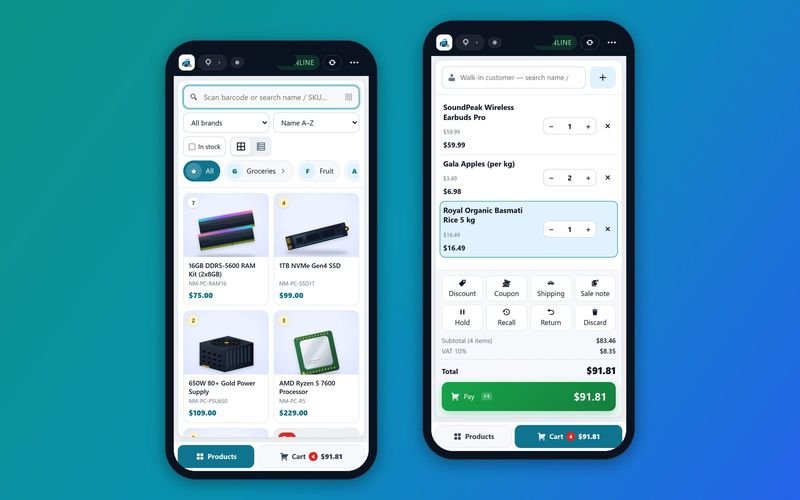
- Phones and tablets ProTablets get the two-pane register; phones switch between Products and Cart.
Online extras
- Card readers ProStripe Terminal and the other integrated readers from the payment dialog, split with other methods.
- Coupons, shipping and customers ProWooCommerce coupons with WooCommerce's own rules, shipping charges and new customers created from the app.
- Sell returns ProPartial returns with or without restocking, refunds to a payment account or back to the card.
- Multi-location devices ProA device can sell for several business locations with per-location stock, accounts and receipt header.
- Mobile Plans ProWith the Mobile Plans & Activations module (included in Pro): plan activations and plan payments, also offline.
- English and Bengali ProSwitch the app language in Settings; more languages can be added.
Get StoreCashier ProUnlock every POS Apps feature plus all other Pro modules.
How POS Apps works
The typical workflow, step by step.
- Add a deviceWP Admin → Inventory Management → Settings → POS Apps → Add device: choose the cashier and location.
- Pair the appEnter the site address and the 8-character pairing code (valid 15 minutes) or scan the QR code.
- SellThe app downloads products, stock, customers, prices and taxes and is ready to sell — online or offline.
- SyncSales upload automatically and become WooCommerce orders; issues are listed for review.
POS Apps screenshots
Real screens from the StoreCashier Pro demo store. Click to enlarge.
Get StoreCashier ProSee it yourself in the live demo (admin / admin), then buy once.
POS Apps FAQ
Answers based on the StoreCashier documentation.
Does the app work without internet?
Yes. Sales, holds, discounts and receipts work offline with manual payment methods. Coupons, shipping, credit sales, online payments, card readers, new customers and returns need a connection and show “Needs internet” while offline.
What happens to offline sales?
They are stored on the device with the stock change and uploaded automatically, in order, when the connection returns. Each one becomes a WooCommerce order. A sale the store cannot accept is kept on the device and listed under Sync issues.
Which devices are supported?
Windows PCs (desktop app with installer) and Android phones and tablets running Android 7.0 or later.
Which printers work?
ESC/POS thermal receipt printers (58 or 80 mm) over a Windows printer, the network (port 9100) or Bluetooth on Android, with cash drawer kick. A4 and HTML printing are available as a fallback.
How many devices can I use?
Pro + POS Apps includes 2 devices and Business includes 5, in any mix of Windows and Android. Extra devices can be added as an add-on.
Do I still need StoreCashier Pro on my site?
Yes. The apps connect to StoreCashier Pro on your WooCommerce site, which stores the orders, stock and payments.
More answers in the full FAQ and the documentation.
Get StoreCashier ProEvery Pro module, the advanced POS, multi-location stock and 60 reports — optional offline POS apps for Windows and Android.
Related modules
Everything in StoreCashier shares one database, so these modules work together out of the box.
POS Register Free + Pro
A full-screen, touch-friendly and keyboard-first register for any desktop, laptop or tablet browser. Every sale is a real WooCommerce order.
Explore POS Register →Multi-location & Staff Free + Pro
Shops, warehouses and branches with their own stock, registers, staff and accounts — compared side by side.
Explore Multi-location & Staff →Inventory Free + Pro
Know your stock down to the product, variation, location and lot — with every movement recorded in an append-only ledger and synced to WooCommerce.
Explore Inventory →Sales & Orders Free + Pro
Website orders and POS sales in one list — with invoices, packing slips, payments, profit, returns and notifications.
Explore Sales & Orders →Reports Free + Pro
A dashboard that respects permissions, 60 built-in reports in StoreCashier Pro and a Report Builder that pins your own charts to the dashboard.
Explore Reports →
Get StoreCashier Pro
POS Apps is included in StoreCashier Pro together with every other module — one plugin, one-time payment.
Not ready for the apps yet? Start with StoreCashier Pro and the web POS, and add the POS Apps package or extra devices later — your data is kept.
Demo login: admin / admin · Free version on WordPress.org · Documentation · Support