POS apps overview PRO APP
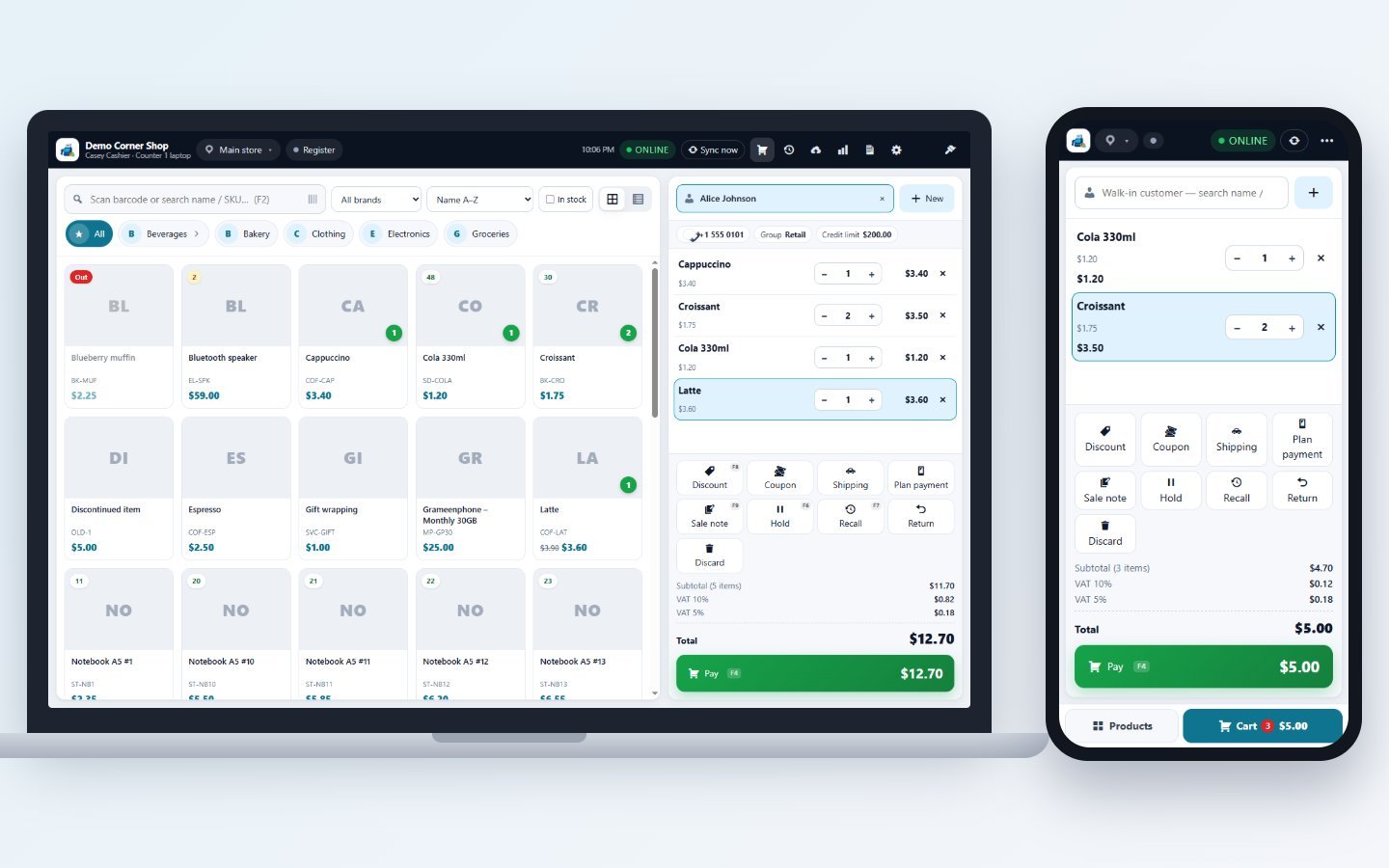
StoreCashier POS is a point-of-sale app for Windows PCs and Android tablets and phones. It sells exactly like the web POS of your website, but it keeps selling when the internet is down: every sale is saved on the device first and uploaded to your shop automatically when the connection returns. This page explains what the apps do, which package you need, what a device needs, and how online and offline work together.
What the apps do#
The app is a till for one cashier. It does not replace your website: products, prices, stock, customers, taxes, payment accounts and settings all stay on the site. The app downloads a copy of what the cashier needs and sends every sale back. On the site each sale becomes a normal WooCommerce order and StoreCashier sale — the same as a sale made in the web POS (same invoice numbers, stock ledger, payments, accounts and reports).
Feature list#
| Feature | Online | Offline | Needs on the site |
|---|---|---|---|
| Sell products, variations, barcode / SKU search, categories, brands | Yes | Yes (cached catalogue) | Pro 1.5.0+ |
| Cash, card terminal with approval code, cheque, other manual methods, split payments | Yes | Yes | Pro 1.5.0+ |
| Line and order discounts within the cashier’s limit, price editing (if allowed) | Yes | Yes | Pro 1.5.0+ |
| Hold / recall carts | Shared with all devices + web POS | On this device, shared later | Pro 1.5.2+ for sharing |
| Credit sale (customer pays later), online payment link | Yes | No | Pro 1.5.0+ |
| Integrated card readers (e.g. Stripe Terminal) | Yes | No | Pro 1.5.1+ |
| Coupons, shipping, quick “New customer”, sell returns, serial / IMEI picker | Yes | No (serials: cached list only) | Pro 1.5.1+ |
| Several business locations per device | Yes | Yes | Pro 1.5.2+ |
| Cash register open / cash in-out / close | Yes | Yes (queued in order) | Pro 1.5.2+ (older sites: online only) |
| Day report / Z-report | Final figures from the server | Provisional figures | Pro 1.5.2+ |
| Mobile plan activations and plan payments | Yes | Yes | Pro 1.5.4+, module “Mobile Plans & Activations” switched on |
| Device license (no key in the app) | Checked by the site on every upload; works ~37 days without contact | Pro 1.5.6 | |
| ESC/POS thermal printing, cash drawer kick | Yes (works on the device, no internet needed) | — | |
| Customer display on a second monitor | Windows only | — | |
| Camera barcode scanning, QR pairing | Android only | — | |
| Automatic installation of updates | Windows (“Update now”); Android shows a download link | Pro 1.5.2+ | |
When a feature needs a newer StoreCashier Pro than the site has, the app simply hides that button — nothing breaks.
Packages and device seats#
The apps have no license key. You buy StoreCashier Pro once, enter the key in the Pro plugin on your website, and every app device that you pair uses one POS device seat of that license. The website gets the device license for the app when it pairs and renews it by itself.
| Package | Price | POS app devices |
|---|---|---|
| Pro | $39 / year or $99 lifetime (Early Bird Offer) | 0 — web POS only |
| Pro + POS Apps | $69 / year or $179 lifetime (Early Bird Offer) | 2 |
| Business | $119 / year or $299 lifetime (Early Bird Offer) | 5 |
| Add-on: extra POS device | $15 / year or $39 lifetime each (Early Bird Offer) | +1 per add-on |
Windows and Android devices count the same. A seat is freed when you Revoke or Delete a device on the site, so you can move a seat to a new computer at any time. The Mobile Plans module is part of every Pro package. Details: Device license (seats) and Buy Pro.
Requirements#
| Item | Requirement | Notes |
|---|---|---|
| Website | WordPress + WooCommerce + StoreCashier Pro (1.5.6 recommended), license active | Writes are refused while the Pro license is not active — the app keeps the sales until it is. |
| Connection to the site | HTTPS | The app refuses plain http:// except for local development addresses (localhost, .test, .local, LAN IPs). |
| Windows | Windows 10 or 11, 64-bit | Per-user installer, no administrator rights needed. |
| Android | Android 7.0 or newer | Tablets get the two-pane register; phones switch between Products and Cart. |
| Cashier | A WordPress user with POS permission | The app uses exactly this user’s POS permissions, payment accounts, discount limit and locations. |
| Optional hardware | USB / network / Bluetooth ESC/POS printer, cash drawer on the printer, barcode scanner (keyboard mode), second monitor | See Thermal printers and Customer display. |
How it works — online and offline#
- Pair. The administrator adds the device on the site and gets a one-time pairing code. The app is connected with that code (Pair a device).
- Download. The app downloads products, stock of its location(s), customers, prices, taxes, payment accounts and settings into a local database on the device.
- Sell. When a sale is completed it gets a unique id and a local number such as
D3-000127. It is saved on the device together with the stock it used, the receipt prints, and the sale goes into the outbox. - Upload. Online, the sale is uploaded at once and gets the real invoice number (for example
INV-1001). Offline, it waits in the outbox and uploads automatically when the connection returns. - Refresh. Every 60 seconds the app downloads what changed on the site (prices, stock, new products, customers). Alt+S or Sync now does it at once.
The header shows the connection: ONLINE, SYNCING or OFFLINE. The app checks the site every 15 seconds. What exactly works offline is listed in Offline mode.
What happens on the site#
- Orders and invoices: each app sale is created by the same code as the web POS checkout: WooCommerce order, StoreCashier sale, invoice number from the normal sequence, payments booked to the cashier’s accounts.
- Date: the order date is the time the sale was made on the device (corrected for a wrong device clock), not the upload time.
- Stock: stock goes down through the normal stock ledger of the sale’s location.
- Customer balance: a credit sale (online only) adds the amount due to the customer’s balance, just like the web POS.
- Reports: app sales appear in every sales, payment, tax and register report. The order keeps the device and the local number for reference.
App or web POS?#
| Question | Web POS | POS app |
|---|---|---|
| Works without internet | No | Yes |
| Installation | None — a browser | Windows installer or Android APK |
| Needs a device seat | No | Yes, one per device |
| Direct thermal printing, drawer kick, customer display | Through the browser print dialog | Built in |
| Mac / iPad / iPhone | Yes | No (Windows and Android only) |
You can use both at the same time: holds, registers and reports are shared.
Does the app need its own license key?
No. The key stays in StoreCashier Pro on your website. Each paired device uses one POS device seat of that license.
Can two cashiers share one device?
A device is paired for one cashier. To change the cashier, pair it again with a code issued for the other cashier (unsynced sales are kept and uploaded after pairing).
Is there an app for macOS or iOS?
No. On a Mac, iPad or iPhone use the web POS in the browser.
Can the app manage products, purchases or accounting?
No. The app is a till. Products, customers, stock and settings are read-only reference data in the app; manage them on the website.